
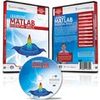
《Matlab基础技巧学习》(Learning Matlab - Essentials Skills)[光盘镜像]
电驴资源
| 用户共享的电驴资源列表 | |
|---|---|
| [Matlab基础技巧学习].Learning.Matlab.Essential.Skills-PLATO.nfo | 10.37 KB |
| [Matlab基础技巧学习].Learning.Matlab.Essential.Skills-PLATO.iso | 756.10 MB |
| 756.11 MB | |
电驴资源简介
| 资源介绍 |
| 文字语言: 英文 |
| 地区: 美国 |
| 对白语言: 英语 |
| 中文名: Matlab基础技巧学习 |
| 英文名: Learning Matlab - Essentials Skills |
| 资源格式: 光盘镜像 |
| 发行日期: 2012年09月21日 |
简介:  在这7个小时的视频系列中,Jason Gibson通过视频教程一步步为你讲授如何使用这个软件包。 课程以逐渐熟悉用户界面和理解怎样与Matlab交互开始,你将学会变量、函数,以及执行基本的计算。 接下来,Jason将指导你学会如何以数字和符号的方式进行代数、三角函数以及微积分计算。 本课程最终以Matlab的基本绘图结束。 快点揭开Matlab的神秘面纱,并通过这个软件来提高你的工作效率吧! In this 7 Hour video series, Jason Gibson teaches you how to use this software package with step-by step video tutorials. The lessons begin with becoming familiar with the user interface and understanding how to interact with Matlab. You'll then learn about variables, functions, and how to perform basic calculations. Next, Jason will guide you in learning how to do Algebra, Trigonometry, and Calculus computations both numerically and symbolically. The course wraps up with basic plotting in Matlab. Take the mystery out of Matlab and improve your productivity with the software immediately! 课程网址:http://www.mathtutordvd.com/products/Learn...ills.cfm 如果看不到下载链接,请到网盘下载:http://pan.baidu.com/share/link?shareid=46...training  ################################### 下载链接来自 Sharevirus/STF/TLF Website Etc. 未经过安装测试与安全检测,使用者后果自负与本论坛无关 软体版权归原作者及其公司所有,如果你喜欢,请购买正版 ################################### 代码 _| _| \ // |_ |_ . \_ \. _ ..\ . //.. _ ./ _/ . . | | \ : \ / : / | | . : | | __\ ....:.. \ / ..:.... /__ | | : _ _ _|___|_/\. | \ \ :.:. / .:.: / / | ./\_|___|_ _ _ \\| : \\ __\ . : /_ : . /__ // : |// \ . \\\ \ :.....: :.....: / /// . / |\ \\\ \ / /// /| [ [ ::::: l \ :::::: \\\ . . /// :::::: / l ::::: ] ] _ __ | \ \\ - P L A T O - // / | __ _ /_|_ _\ ___ _____ / /_ _|_\ __________/\_ _____ / \_ ___________ ____/ //___ _______ / \ \ / \/ / \ / / / / / \__ ___/ \ / /________/ / / / \/ // / \ \ // / \ / / /\ / / \ \ /____\ \ /\ \_\ \ / \ \ /\ / \ // / \_______/______ _ //\______//\// \_______/\________/ __ _ _ ___ __ _ \/ _ _ __ ___ _ _:__ _ _ __\ |\/// // \\ \\\/| /__ _ _ | // // 423 BC - 347 BC \\ \\ | _:_ _ _ _ |//__//__ _ _ _ _ __\\__\\| _ _ _ _:_ | | | Learning Matlab - Essential Skills | :_ _ _ _ _ ...__..__ _ _ _ _ __..__... _ _ _ _ _: | | | Date [ 2012-09-21 ] Disks [ xx/28 ] | :_ _ _ _ _ ...__..__ _ _ _ _ __..__... _ _ _ _ _: | | | The lessons begin with becoming familiar with the user interface | | and understanding how to interact with Matlab. You'll then learn | | about variables, functions, and how to perform basic calculations. | | | | Next, Jason will guide you in learning how to do Algebra, | | Trigonometry, and Calculus computations both numerically and | | symbolically. The course wraps up with basic plotting in Matlab. | | | | 1. Introduction | | - 1: Overview of the User Interface - Part 1 | | - 2: Overview of the User Interface - Part 2 | | - 3: Overview of the User Interface - Part 3 | | - 4: Using the Help Menus | | | | 2. Basic Calculations | | - 5: Basic Arithmetic and Order of Operations | | - 6: Exponents and Scientific Notation | | - 7: Working with Fractions and the Symbolic Math Toolbox - Part 1 | | - 8: Working with Fractions and the Symbolic Math Toolbox - Part 2 | | | | 3. Working with Variables | | - 9: Defining and Using Variables | | - 10: Adding Comments to your Code | | - 11: Clearing Variables | | - 12: Adjusting the Display Precision for Calculations | | - 13: Creating and Storing Symbolic Variables | | - 14: Using Symbolic Variables in Calculations | | | | 4. Essential Mathematical Functions | | - 15: Factorials, Square Roots, and Nth Roots | | - 16: Trigonometric Functions and their Inverses | | - 17: Hyperbolic Functions | | - 18: Exponentials and Logarithms | | | | 5. Working with Complex Numbers | | - 19: Basic Calculations with Complex Numbers | | - 20: Calculating the Magnitude and Angle of Complex Numbers | | - 21: Trig Functions and Logarithms with Complex Numbers | | - 22: Complex Numbers and the Symbolic Math Toolbox | | | | 6. Working with Vectors | | - 23: Inputting Vectors and Extracting Components | | - 24: Adding and Subtracting Vectors and Multiplying Vectors by a | Scalar | | - 25: Calculating the Vector Dot Product and Cross Product | | - 26: Finding the Length and Sum of a Vector | | - 27: Extracting a Subset of Vector Elements | | - 28: Creating Vectors with Evenly Spaced Elements | | - 29: Joining Vectors Together | | - 30: Multiplying and Dividing Vectors Element-by-Element | | - 31: Applying Math Functions Element-by-Element | | - 32: Creating Vectors with Random Elements | | - 33: Calculating Mean, Median, and Standard Deviation of Data in a | Vector | | - 34: Working with Vectors using the Symbolic Math Toolbox | | | | 7. Working with Matrices | | - 35: Inputting Matrices and Extracting Elements - Part 1 | | - 36: Inputting Matrices and Extracting Elements - Part 2 | | - 37: Adding and Subtracting Matrices | | - 38: Multiplying Matrices | | - 39: Multiplying and Dividing Matrices Element-by-Element | | - 40: Finding the Matrix Length, Size, and Sum of Elements | | - 41: Joining Matrices Together | | - 42: Applying Mathematical Functions to Matrices | | - 43: Creating an Identity Matrix | | - 44: Matrix Transpose, Diagonal Elements, and LU Decomposition | | - 45: Solving a System of Equations using Matrix Row Reductions | | - 46: Matrix Determinant, Inverse, Trace, Rank, and Solving Linear | | Systems | | - 47: Matrix Norm, Eigenvalues, and the Characteristic Polynomial | | - 48: Matrices and the Symbolic Math Toolbox | | | | 8. Algebraic Calculations | | - 49: Solving Algebraic Equations | | - 50: Solving Systems of Linear Equations | | - 51: Solving Algebraic Equations Symbolically | | - 52: Solving Systems of Algebraic Equations Symbolically | | - 53: Defining Mathematical Functions | | | | 9. Calculus Calculations | | - 54: Taking Derivatives in Calculus | | - 55: Evaluating Derivatives at a Point | | - 56: Taking Partial Derivatives in Calculus | | - 57: Indefinite and Definite Integrals | | - 58: Taking Limits in Calculus | | | | 10. Basic Graphing | | - 59: Basic Scatter Plots | | - 60: Plotting Functions | | - 61: Changing Plot Appearance | :_ _ _ _ _ ...__..__ _ _ _ _ __..__... _ _ _ _ _: | | | I - Unwrap the book. | | II - Mount the book to access it's contents. | | III - Watch, learn and expand your mind. | |_._ _ _ _ . . _ _ _ _._| : _ / . team.plato@inbox.lv . \ _ : \/|___:__ __:___|\/ _ _ | / G R E E T I N G S \ | _ _ \\ |/ \| // \\ / - - * - - \ // .\\/| |\//. | | iNKiSO, QUASAR, JGTiSO, AG, HELL | | . | | . : | | __\ ....:.. \ / ..:.... /__ | | : _ _ _|___|_/\. | \ \ :.:. / .:.: / / | ./\_|___|_ _ _ \\| : \\ __\ . : /_ : . /__ // : |// \ . \\\ \ :.....: :.....: / /// . / |\ \\\ \ / /// /| [ [ ::::: l \ :::::: \\\ . . /// :::::: / l ::::: ] ] _ __ | \ \\ - P L A T O - // / | __ _ /_|_ _\ \ / /_ _|_\ |