
《视频缩略图抓取工具》(SUU-Design Video Thumbnails Maker)v3.0.0.2/含注册机[压缩包]
电驴资源
| 用户共享的电驴资源列表 | |
|---|---|
| [视频缩略图抓取工具].SUU-Design.Video.Thumbnails.Maker.v3.0.0.2.Incl.KeyMaker-DVT.zip | 1.94 MB |
| 1.94 MB | |
电驴资源简介
中文名: 视频缩略图抓取工具英文名: SUU-Design Video Thumbnails Maker资源格式: 压缩包版本: v3.0.0.2/含注册机发行时间: 2010年制作发行: SUU-Design地区: 德国语言: 英文简介:

软件类型:多媒体类-媒体其它
软件性质:破解软件
操作系统:Windows
应用平台:WinAll
问题反馈:suu@tut.by
网站链接:http://www.suu-design.com/projects.html#VTM
引用Microsoft .NET Framework 2.0+ is required引用可能需要更新DirectX至最新版本引用Changelog:
Updated to v3.0.0.2
[M] Engines speed is increased.
Please pay attention to my new project - Twins by Scorp! Twins by Scorp is a beautiful concentration memory game with simple rules for you and your family. More info at www.suu-design.com.
[M] New setting - TXT . Instructs the processing engine to make a separate TXT-file with technical details, according to options selected in the Options window.
[M] New setting - XML . Instructs the processing engine to make a separate XML-file with technical details in spite of options selected in the Options window.
[M] New setting - General CSV-file . Allows to get one general CSV-file with technical details about all files form the list, according to options selected in the Options window.
[M] New setting - General XML-file . Allows to get one general XML-file with technical details about all files form the list in spite of options selected in the Options window.
[M] Environment window is redesigned.
[M] More detailed errors logging into Diad.log file situated in the program's folder.
[M] A few cosmetic changes.
[M] Audio/video information module is updated significantly.
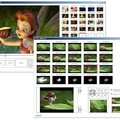
Video Thumbnails Maker可以帮助你高效地获取视频文件的截图和缩略图。支持多种视频格式。高级自定义截图。软件内含图片浏览器。


Video Thumbnails Maker allows you to make thumbnails (caps, previews, screen-lists) and screenshots of video files. The utility can be used for home-video cataloging and for network video sharing support.
Video Thumbnails Maker is coming with its own Viewer! The main advantage of the Viewer is the ability to start the related video-file right from the Viewer! The process is automatic in activated version. In usual version you can set the link between the picture and the video-file manually within the Viewer.
The main features of the program:
Supports of the batch processing of videofiles.
Supports of practically any videos-formats (even MOV, QT, FLV, SWF, RM if you have appropriate codecs). If the file can be normally played in your video-player (Windows Media Player or BSPlayer), it can be processed by the program.
Several ways to choose shots manually (including crop ability), learn more.
You can pause/continue or stop active job at any moment.
Visual preview of your settings right in the Options window! Momentary rendering. Never before the creation of thumbnails was so simple! Maximum freedom for your creativity.
Possibility to save each shot in separate file.
Command line interface support, learn more.
Own Viewer allows to start the related video-file right from the picture-Viewer! The process is automatic in activated version, learn more. In usual version you can set the link between the picture and the video-file manually within the Viewer.
Import and export options presets.
Options preset file format (*.vtm). After you run the preset, the program is automatically opened with the imported tuning. Very useful.
6 interface languages (English, Belarusian, Russian, Ukranian, German, French).
5 customizable base -presets.
Ability to export Video and Audio technical details in CSV and XML file formats.
Statistics of the progress of the program (F1 window).
If you support the project, you can receive an email stating the amount you have donated, and a special activation key for the program. The key allows you to personalize the program, and depending on the amount you donated you will receive special status (silver, gold, platinum), learn more.
Watermarks (alpha-channels and transparency are supported). Make your own style.
Ability to use your images as background images for preview.
Autoadjustment of height of a shot option.
Global stroke and stroke tiles options.
Fit screen option (autoadjustment of the shots to fit your screen resolution).
Special effects (drop shadow, gray scale, cut edges).
Customizable fonts, colors, contours, shadows, frames, background, text.
Stamp time in shots option (5 different locations, transparency, contour).
Video information stamp option (4 different locations and customizable configurations).
Audio/Video info option.
Custom comment option.
Three rendering engines (Engine 2 is recommended to be used under 64-bit OS).
Try to substitute black frames option.
The program's small size.
Hot keys.
代码°²²²±±±² SUU-Design Video Thumbnails Maker v3.0.0.2
²²² ²² Released on 01/20/10 for exclusive usage by ²² ²²²
²² ° members of the release scene. This isnt something ° ²²
° ² ° to share with your school mates and not for sale. ° ² °
² °²±² ° Go and ask mommy to buy this app if you like it! ° ²±²° ²
²²²± ° ° ±²²²
° °± Company .. SUU-Design ±° ° ±
±° Url ...... www.suu-design.com °± °
²² ²² ²² ²²
²
²² ° ° ²²
° ² ° Video Thumbnails Maker by Scorp ° ² °
² °²±² ° ° ²±²° ²
²²²± ° The latest version of the program is available in ° ±²²²
° °± the Downloads section of the site. ±° ° ±
±° °± °
²² ²² ²² ²²
²²² ²² Microsoft .NET Framework 2.0+ is required. You can ²² ²²²
²² ° download the Microsoft .NET Framework 2.0 ° ²²
° ² ° redistributable package x86 here or here 23 Mb . ° ² °
² °²±² ° ° ²±²° ²
²²²± ° Video Thumbnails Maker allows you to make ° ±²²²
° °± thumbnails caps, previews, screen-lists and ±° ° ±
±° screenshots of video files. The utility can be used °± °
²² ²² for home-video cataloging and for network video ²² ²²
²²² ²² sharing support. ²² ²²²
²² ° ° ²²
° ² ° Video Thumbnails Maker is coming with its own ° ² °
² °²±² ° Viewer! The main advantage of the Viewer is the ° ²±²° ²
²²²± ° ability to start the related video-file right from ° ±²²²
° °± the Viewer! The process is automatic in activated ±° ° ±
±° version. In usual version you can set the link °± °
²² ²² between the picture and the video-file manually ²² ²²
²²² ²² within the Viewer. ²² ²²²
²² ° ° ²²
° ² ° Screenshots of the program ° ² °
² °²±² ° Work in progress, watch 32 kb ° ²±²° ²
²²²± ° Options window F2 , watch 40 kb ° ±²²²
° °± Environment window F3 , watch 50 kb ±° ° ±
±° Fragments of the Choose shots manually °± °
²² ²² interfaces, watch 63 kb ²² ²²
²²² ²² ²² ²²²
²² ° The results ° ²²
° ² ° Base-preset N1 result, watch 155 kb ° ² °
² °²±² ° Base-preset N2 result, watch 200 kb ° ²±²° ²
²²²± ° Base-preset N3 result, watch 240 kb ° ±²²²
° °± Base-preset N4 result, watch 225 kb ±° ° ±
±° Base-preset N5 result, watch 230 kb °± °
²² ²² Base-preset N5 result, watch 195 kb ²² ²²
²²² ²² Base-preset N1 result, watch 195 kb ²² ²²²
²² ° Also you can create such original pictures, watch ° ²²
° ² ° 43 kb ° ² °
² °²±² ° ° ²±²° ²
²²²± ° The main features of the program ° ±²²²
° °± Supports of the batch processing of videofiles. ±° ° ±
±° Supports of practically any videos-formats even °± °
²² ²² MOV, QT, FLV, SWF, RM if you have appropriate ²² ²²
²²² ²² codecs . If the file can be normally played in your ²² ²²²
²² ° video-player Windows Media Player or BSPlayer , it ° ²²
° ² ° can be processed by the program. ° ² °
² °²±² ° Several ways to choose shots manually including ° ²±²° ²
²²²± ° crop ability , learn more. ° ±²²²
° °± You can pause/continue or stop active job at any ±° ° ±
±° moment. °± °
²² ²² Visual preview of your settings right in the ²² ²²
²²² ²² Options window! Momentary rendering. Never before ²² ²²²
²² ° the creation of thumbnails was so simple! Maximum ° ²²
° ² ° freedom for your creativity. ° ² °
² °²±² ° Possibility to save each shot in separate file. ° ²±²° ²
²²²± ° Command line interface support, learn more. ° ±²²²
° °± Own Viewer allows to start the related video-file ±° ° ±
±° right from the picture-Viewer! The process is °± °
²² ²² automatic in activated version, learn more. In ²² ²²
²²² ²² usual version you can set the link between the ²² ²²²
²² ° picture and the video-file manually within the ° ²²
° ² ° Viewer. ° ² °
² °²±² ° Import and export options presets. ° ²±²° ²
²²²± ° Options preset file format *.vtm . After you run ° ±²²²
° °± the preset, the program is automatically opened ±° ° ±
±° with the imported tuning. Very useful. °± °
²² ²² 6 interface languages English, Belarusian, ²² ²²
²²² ²² Russian, Ukranian, German, French . ²² ²²²
²² ° 5 customizable base -presets. ° ²²
° ² ° Ability to export Video and Audio technical details ° ² °
² °²±² ° in CSV and XML file formats. ° ²±²° ²
²²²± ° Statistics of the progress of the program F1 ° ±²²²
° °± window . ±° ° ±
±° If you support the project, you can receive an °± °
²² ²² email stating the amount you have donated, and a ²² ²²
²²² ²² special activation key for the program. The key ²² ²²²
²² ° allows you to personalize the program, and ° ²²
° ² ° depending on the amount you donated you will ° ² °
² °²±² ° receive special status silver, gold, platinum , ° ²±²° ²
²²²± ° learn more. ° ±²²²
° °± Watermarks alpha-channels and transparency are ±° ° ±
±° supported . Make your own style. °± °
²² ²² Ability to use your images as background images for ²² ²²
²²² ²² preview. ²² ²²²
²² ° Autoadjustment of height of a shot option. ° ²²
° ² ° Global stroke and stroke tiles options. ° ² °
² °²±² ° Fit screen option autoadjustment of the shots to ° ²±²° ²
²²²± ° fit your screen resolution . ° ±²²²
° °± Special effects drop shadow, gray scale, cut ±° ° ±
±° edges . °± °
²² ²² Customizable fonts, colors, contours, shadows, ²² ²²
²²² ²² frames, background, text. ²² ²²²
²² ° Stamp time in shots option 5 different locations, ° ²²
° ² ° transparency, contour . ° ² °
² °²±² ° Video information stamp option 4 different ° ²±²° ²
²²²± ° locations and customizable configurations . ° ±²²²
° °± Audio/Video info option. ±° ° ±
±° Custom comment option. °± °
²² ²² Three rendering engines Engine 2 is recommended to ²² ²²
²²² ²² be used under 64-bit OS . ²² ²²²
²² ° Try to substitute black frames option. ° ²²
° ² ° The program's small size. ° ² °
² °²±² ° Hot keys. ° ²±²° ²
²² ° ° ²²
° ² ° 1. Unpack Install ... ° ² °
² °²±² ° 2. Use KeyMaker to get Activation Code ° ²±²° ²
²²²± ° 3. Install newest DirectX ! ° ±²²²
° ² ° You got something to offer like ° ² °
² °²±² ° ° ²±²° ²
²²²± ° * supplies either ISO or DDL ° ±²²²
° °± * cracking skills ±° ° ±
±° * pizza °± °
²² ²² ²² ²²
²²² ²² and want to join the only scene family in existance? ²² ²²²
²² ° Then just ask around on IRC maybe even your girl- ° ²²
° ² ° friend may know one of our council members, be it ° ² °
² °²±² ° the one or the other way... and lets see if you ° ²±²° ²
²²²± ° fit into one of our open positions! ° ±²²²
° °± ±° ° ±
[安全检测]
★未经过安全检测
[安装测试]
★未经过安装测试,使用者后果自负与本论坛无关。
[免责声明]
★本帖介绍的文本内容转自网络,如有出入则以官方站点公布之信息为准,凡摘自网络相关图文介绍内容的本帖不另行标注出处,原创作者如有异议可提出以便删除。
★关于软件破解及注册机可能被杀毒软件报病毒或间谍木马(若已检测到的则将在帖中特别标注),请自行甄别和取舍,不另行加以解释。
★资源下载后请对文件做必要的安全检测,该下载内容仅限于个人测试学习之用,不得用于商业用途,并且请在下载后24小时内删除。
★各计算机系统环境各不相同,因此不保证该软件完全兼容于你的计算机系统,最终解决软件安装运行问题请联络官方站点寻求相关技术支持。
★凡标注为下载链接转自其他站点的,无法保证资源的供源以及资源本身等情况的完整性和可用性(不可控)。
★资源版权归作者及其公司所有,如果你喜欢,请购买正版。
软件类型:多媒体类-媒体其它
软件性质:破解软件
操作系统:Windows
应用平台:WinAll
问题反馈:suu@tut.by
网站链接:http://www.suu-design.com/projects.html#VTM
引用Microsoft .NET Framework 2.0+ is required引用可能需要更新DirectX至最新版本引用Changelog:
Updated to v3.0.0.2
[M] Engines speed is increased.
Please pay attention to my new project - Twins by Scorp! Twins by Scorp is a beautiful concentration memory game with simple rules for you and your family. More info at www.suu-design.com.
[M] New setting - TXT . Instructs the processing engine to make a separate TXT-file with technical details, according to options selected in the Options window.
[M] New setting - XML . Instructs the processing engine to make a separate XML-file with technical details in spite of options selected in the Options window.
[M] New setting - General CSV-file . Allows to get one general CSV-file with technical details about all files form the list, according to options selected in the Options window.
[M] New setting - General XML-file . Allows to get one general XML-file with technical details about all files form the list in spite of options selected in the Options window.
[M] Environment window is redesigned.
[M] More detailed errors logging into Diad.log file situated in the program's folder.
[M] A few cosmetic changes.
[M] Audio/video information module is updated significantly.
Video Thumbnails Maker可以帮助你高效地获取视频文件的截图和缩略图。支持多种视频格式。高级自定义截图。软件内含图片浏览器。
Video Thumbnails Maker allows you to make thumbnails (caps, previews, screen-lists) and screenshots of video files. The utility can be used for home-video cataloging and for network video sharing support.
Video Thumbnails Maker is coming with its own Viewer! The main advantage of the Viewer is the ability to start the related video-file right from the Viewer! The process is automatic in activated version. In usual version you can set the link between the picture and the video-file manually within the Viewer.
The main features of the program:
Supports of the batch processing of videofiles.
Supports of practically any videos-formats (even MOV, QT, FLV, SWF, RM if you have appropriate codecs). If the file can be normally played in your video-player (Windows Media Player or BSPlayer), it can be processed by the program.
Several ways to choose shots manually (including crop ability), learn more.
You can pause/continue or stop active job at any moment.
Visual preview of your settings right in the Options window! Momentary rendering. Never before the creation of thumbnails was so simple! Maximum freedom for your creativity.
Possibility to save each shot in separate file.
Command line interface support, learn more.
Own Viewer allows to start the related video-file right from the picture-Viewer! The process is automatic in activated version, learn more. In usual version you can set the link between the picture and the video-file manually within the Viewer.
Import and export options presets.
Options preset file format (*.vtm). After you run the preset, the program is automatically opened with the imported tuning. Very useful.
6 interface languages (English, Belarusian, Russian, Ukranian, German, French).
5 customizable base -presets.
Ability to export Video and Audio technical details in CSV and XML file formats.
Statistics of the progress of the program (F1 window).
If you support the project, you can receive an email stating the amount you have donated, and a special activation key for the program. The key allows you to personalize the program, and depending on the amount you donated you will receive special status (silver, gold, platinum), learn more.
Watermarks (alpha-channels and transparency are supported). Make your own style.
Ability to use your images as background images for preview.
Autoadjustment of height of a shot option.
Global stroke and stroke tiles options.
Fit screen option (autoadjustment of the shots to fit your screen resolution).
Special effects (drop shadow, gray scale, cut edges).
Customizable fonts, colors, contours, shadows, frames, background, text.
Stamp time in shots option (5 different locations, transparency, contour).
Video information stamp option (4 different locations and customizable configurations).
Audio/Video info option.
Custom comment option.
Three rendering engines (Engine 2 is recommended to be used under 64-bit OS).
Try to substitute black frames option.
The program's small size.
Hot keys.
代码°²²²±±±² SUU-Design Video Thumbnails Maker v3.0.0.2
²²² ²² Released on 01/20/10 for exclusive usage by ²² ²²²
²² ° members of the release scene. This isnt something ° ²²
° ² ° to share with your school mates and not for sale. ° ² °
² °²±² ° Go and ask mommy to buy this app if you like it! ° ²±²° ²
²²²± ° ° ±²²²
° °± Company .. SUU-Design ±° ° ±
±° Url ...... www.suu-design.com °± °
²² ²² ²² ²²
²
²² ° ° ²²
° ² ° Video Thumbnails Maker by Scorp ° ² °
² °²±² ° ° ²±²° ²
²²²± ° The latest version of the program is available in ° ±²²²
° °± the Downloads section of the site. ±° ° ±
±° °± °
²² ²² ²² ²²
²²² ²² Microsoft .NET Framework 2.0+ is required. You can ²² ²²²
²² ° download the Microsoft .NET Framework 2.0 ° ²²
° ² ° redistributable package x86 here or here 23 Mb . ° ² °
² °²±² ° ° ²±²° ²
²²²± ° Video Thumbnails Maker allows you to make ° ±²²²
° °± thumbnails caps, previews, screen-lists and ±° ° ±
±° screenshots of video files. The utility can be used °± °
²² ²² for home-video cataloging and for network video ²² ²²
²²² ²² sharing support. ²² ²²²
²² ° ° ²²
° ² ° Video Thumbnails Maker is coming with its own ° ² °
² °²±² ° Viewer! The main advantage of the Viewer is the ° ²±²° ²
²²²± ° ability to start the related video-file right from ° ±²²²
° °± the Viewer! The process is automatic in activated ±° ° ±
±° version. In usual version you can set the link °± °
²² ²² between the picture and the video-file manually ²² ²²
²²² ²² within the Viewer. ²² ²²²
²² ° ° ²²
° ² ° Screenshots of the program ° ² °
² °²±² ° Work in progress, watch 32 kb ° ²±²° ²
²²²± ° Options window F2 , watch 40 kb ° ±²²²
° °± Environment window F3 , watch 50 kb ±° ° ±
±° Fragments of the Choose shots manually °± °
²² ²² interfaces, watch 63 kb ²² ²²
²²² ²² ²² ²²²
²² ° The results ° ²²
° ² ° Base-preset N1 result, watch 155 kb ° ² °
² °²±² ° Base-preset N2 result, watch 200 kb ° ²±²° ²
²²²± ° Base-preset N3 result, watch 240 kb ° ±²²²
° °± Base-preset N4 result, watch 225 kb ±° ° ±
±° Base-preset N5 result, watch 230 kb °± °
²² ²² Base-preset N5 result, watch 195 kb ²² ²²
²²² ²² Base-preset N1 result, watch 195 kb ²² ²²²
²² ° Also you can create such original pictures, watch ° ²²
° ² ° 43 kb ° ² °
² °²±² ° ° ²±²° ²
²²²± ° The main features of the program ° ±²²²
° °± Supports of the batch processing of videofiles. ±° ° ±
±° Supports of practically any videos-formats even °± °
²² ²² MOV, QT, FLV, SWF, RM if you have appropriate ²² ²²
²²² ²² codecs . If the file can be normally played in your ²² ²²²
²² ° video-player Windows Media Player or BSPlayer , it ° ²²
° ² ° can be processed by the program. ° ² °
² °²±² ° Several ways to choose shots manually including ° ²±²° ²
²²²± ° crop ability , learn more. ° ±²²²
° °± You can pause/continue or stop active job at any ±° ° ±
±° moment. °± °
²² ²² Visual preview of your settings right in the ²² ²²
²²² ²² Options window! Momentary rendering. Never before ²² ²²²
²² ° the creation of thumbnails was so simple! Maximum ° ²²
° ² ° freedom for your creativity. ° ² °
² °²±² ° Possibility to save each shot in separate file. ° ²±²° ²
²²²± ° Command line interface support, learn more. ° ±²²²
° °± Own Viewer allows to start the related video-file ±° ° ±
±° right from the picture-Viewer! The process is °± °
²² ²² automatic in activated version, learn more. In ²² ²²
²²² ²² usual version you can set the link between the ²² ²²²
²² ° picture and the video-file manually within the ° ²²
° ² ° Viewer. ° ² °
² °²±² ° Import and export options presets. ° ²±²° ²
²²²± ° Options preset file format *.vtm . After you run ° ±²²²
° °± the preset, the program is automatically opened ±° ° ±
±° with the imported tuning. Very useful. °± °
²² ²² 6 interface languages English, Belarusian, ²² ²²
²²² ²² Russian, Ukranian, German, French . ²² ²²²
²² ° 5 customizable base -presets. ° ²²
° ² ° Ability to export Video and Audio technical details ° ² °
² °²±² ° in CSV and XML file formats. ° ²±²° ²
²²²± ° Statistics of the progress of the program F1 ° ±²²²
° °± window . ±° ° ±
±° If you support the project, you can receive an °± °
²² ²² email stating the amount you have donated, and a ²² ²²
²²² ²² special activation key for the program. The key ²² ²²²
²² ° allows you to personalize the program, and ° ²²
° ² ° depending on the amount you donated you will ° ² °
² °²±² ° receive special status silver, gold, platinum , ° ²±²° ²
²²²± ° learn more. ° ±²²²
° °± Watermarks alpha-channels and transparency are ±° ° ±
±° supported . Make your own style. °± °
²² ²² Ability to use your images as background images for ²² ²²
²²² ²² preview. ²² ²²²
²² ° Autoadjustment of height of a shot option. ° ²²
° ² ° Global stroke and stroke tiles options. ° ² °
² °²±² ° Fit screen option autoadjustment of the shots to ° ²±²° ²
²²²± ° fit your screen resolution . ° ±²²²
° °± Special effects drop shadow, gray scale, cut ±° ° ±
±° edges . °± °
²² ²² Customizable fonts, colors, contours, shadows, ²² ²²
²²² ²² frames, background, text. ²² ²²²
²² ° Stamp time in shots option 5 different locations, ° ²²
° ² ° transparency, contour . ° ² °
² °²±² ° Video information stamp option 4 different ° ²±²° ²
²²²± ° locations and customizable configurations . ° ±²²²
° °± Audio/Video info option. ±° ° ±
±° Custom comment option. °± °
²² ²² Three rendering engines Engine 2 is recommended to ²² ²²
²²² ²² be used under 64-bit OS . ²² ²²²
²² ° Try to substitute black frames option. ° ²²
° ² ° The program's small size. ° ² °
² °²±² ° Hot keys. ° ²±²° ²
²² ° ° ²²
° ² ° 1. Unpack Install ... ° ² °
² °²±² ° 2. Use KeyMaker to get Activation Code ° ²±²° ²
²²²± ° 3. Install newest DirectX ! ° ±²²²
° ² ° You got something to offer like ° ² °
² °²±² ° ° ²±²° ²
²²²± ° * supplies either ISO or DDL ° ±²²²
° °± * cracking skills ±° ° ±
±° * pizza °± °
²² ²² ²² ²²
²²² ²² and want to join the only scene family in existance? ²² ²²²
²² ° Then just ask around on IRC maybe even your girl- ° ²²
° ² ° friend may know one of our council members, be it ° ² °
² °²±² ° the one or the other way... and lets see if you ° ²±²° ²
²²²± ° fit into one of our open positions! ° ±²²²
° °± ±° ° ±
[安全检测]
★未经过安全检测
[安装测试]
★未经过安装测试,使用者后果自负与本论坛无关。
[免责声明]
★本帖介绍的文本内容转自网络,如有出入则以官方站点公布之信息为准,凡摘自网络相关图文介绍内容的本帖不另行标注出处,原创作者如有异议可提出以便删除。
★关于软件破解及注册机可能被杀毒软件报病毒或间谍木马(若已检测到的则将在帖中特别标注),请自行甄别和取舍,不另行加以解释。
★资源下载后请对文件做必要的安全检测,该下载内容仅限于个人测试学习之用,不得用于商业用途,并且请在下载后24小时内删除。
★各计算机系统环境各不相同,因此不保证该软件完全兼容于你的计算机系统,最终解决软件安装运行问题请联络官方站点寻求相关技术支持。
★凡标注为下载链接转自其他站点的,无法保证资源的供源以及资源本身等情况的完整性和可用性(不可控)。
★资源版权归作者及其公司所有,如果你喜欢,请购买正版。