
《硬盘空间管理软件》( JAM Software SpaceObServer Enterprise)v5.1.0.817 Retail[压缩包]
电驴资源
| 用户共享的电驴资源列表 | |
|---|---|
| [硬盘空间管理软件].JAM.Software.SpaceObServer.Enterprise.v5.1.0.817.retail-FOSI.zip | 19.76 MB |
| 19.76 MB | |
电驴资源简介
| 资源介绍 |
| 发行时间: 2012年 |
| 英文名: JAM Software SpaceObServer Enterprise |
| 资源格式: 压缩包 |
| 语言: 英文 |
| 版本: v5.1.0.817 Retail |
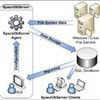
简介:  软件类型:系统软件 - 磁盘工具 软件性质:破解软件 操作系统:Windows 应用平台:Windows 98 thru Vista and Server 2003/2008 and Windows 7 问题反馈:https://www.jam-software.de/customers/contact.php?language=EN 网站链接:http://www.jam-software.com/spaceobserver/ 软件介绍: SpaceObServer是一款Windows 2000/XP/2003的硬盘空间管理软件。它使用后台服务程序扫描文件夹列表,并将扫描结果(包括结构视图、大小及属性等)导出为MS Access或MS SQL Server数据库格式保存。     资源更新列表 http://www.VeryCD.com/i/5190747/create/fol...postTime SpaceObServer is a powerful and flexible hard disk space manager for Windows. The database-based software is available as Standard and Enterprise Edition. The comparison table lists the feature differences of the editions. SpaceObServer scans local and network drives as well as Exchange mailboxes using a background service and stores their structure, sizes and properties in an SQL database. Linux and Unix filesystems can be scanned via SSH (Secure Shell). In an Explorer-like user interface the collected data can be viewed and browsed in hierarchical or tabular views, 3D bar, pie, line charts and tree maps. Using the archived data you are able to track the development of the space usage from past to present, and forecast future size usage. A flexible file search, with predefined searches for very big, old or obsolete files allows filtering and listing files directly from the database. A duplicate file search is also included. The SpaceObServer Remote Client is a management tool to configure scans, view scan results and generate exports remotely from additional machines in your network. Take a visual tour or learn in our product data sheet how to manage your disk space with SpaceObServer continuously and transparently... Our Case Study shows you how SpaceObServer is applied at SCHOTT Solar. Scan Continuously A background service, the SpaceObServer Agent, regularly scans selected drives and stores the collected data in an SQL database. Scan network drives without the need to install additional software on the servers you want to observe. Determine disk space occupied by Exchange mailboxes (down to folder level)* By using the NTFS Change Journals SpaceObServer is able to update information about local NTFS drives continuously, which results in disk usage information that is always up to date. Linux and Unix file systems can be scanned directly via SSH (Secure Shell)* or NFS (Network File System) Analyze Disk Space The size of each folder is displayed directly in the file system tree. This way you can easily discover which folders occupy most of your hard disk space. A space usage history shows development over time and provides an approximated forecast for the future View, print and export 3D bar, pie, line charts and tree maps Scanned directories can be merged in "containers" - allows analyses across drives, e.g. search for duplicate files A list displays the size for each folder grouped by users or file extensions Search for Files Highly customizable file search allows filtering your files by size, last change, last access and creation date, extension, filename and path pattern, file attributes, owner or full path length. Filter options are applied directly to the directory tree and all other views. Duplicate files can be identified by the MD5 checksum of their content or a combination of name, size and last change date. Clean up Disk Space Marked directories and files can be easily moved, zipped or deleted. You can choose to keep file permissions and create stub files for moved files. Modern deduplication: Support for the file based NTFS compression, hard links and alternate data streams (ADS) Export Results Printed report (showing the directory structure), Excel, XML, PDF, HTML, text file or clipboard Charts can be exported in common graphic formats (JPG, GIF or PNG) Automated Reporting via OLE Automation* The OLE Automation interface allows scheduling your exports from within your own scripts or applications* All programming languages that offer an OLE Automation interface are supported (e.g. C#, VBScript, VB.NET, Delphi, Windows PowerShell, VBA in Microsoft Office) Programming examples are included Customized View Visibility and order of the columns can be configured for the details view and each export type separately You can easily customize the output format, e.g. number of decimals, size unit (Byte, KB, MB, GB, TB or automatic display of an appropriate size unit), etc. Support for: Unicode file and directory names Explorer context menu is supported within SpaceObServer File paths > 255 characters Supported Operating Systems Windows 8 (32 Bit / 64 Bit) Windows 7 (32 Bit / 64 Bit) Windows Vista (32 Bit / 64 Bit) Windows XP (32 Bit / 64 Bit) Windows Server 2008 R2 (64 Bit) Windows Server 2008 (32 Bit / 64 Bit) Windows Server 2003 (32 Bit / 64 Bit) 代码 ÜÛÛÛÛÛÛÛÛÛÛÛÛÛÛÛÛÛÛÛÜ ÛÛÛÛÛÛÛÛÛÛÛÛÛÛÛÛÛÛÛÛÛÛÛÜ ÜÛÛÛ°±±±±±±±±±±±±±±±±±±±ÛÛÛ ÜÛÛÛÛÛÛÛÛÛÛÛÛÜ ÜÛÛ²²²±²²²²²²²²²²²²²²²²²²²²²ÛÛ± ÛÛÛ²°° °ÛÛÛÛÛÜ ÜÛÛÛÛÛÛÛÛÛÛ°±ÛÛÛÛÛÛÛ²²±±±±±±±±±±±±±±±±±°°±±²ÛÛÛÛ² ²ÛÛÜ ÜÛÛÛ °ÛÛÛ±±±²±±±²ÛÛÛÛÛ±²²²²²²²²²²²ÛÛÛ²±±±±ÛÛ ÛÛÛÛÛÛÛÛÛ² ±ÛÛ ÛÛ °²ÛÛÛ° °Û²±²²±²ÛÛÛÛÛ²±±±±±±±±±±±±²ÛÛÛÛÛ²±±Û ÛÛÛÛÛÛÛÛÛÛÛÛÛÛ² ÛÛ Û² ±ÛÛÛÛÛÛÛÛÛ± Û²±±²ÛÛÛ±°°±±²²ÛÛÛÛÛÛÛ²²²±²±ÛÛÛ²Û ÛÛÛÛ° ±Û²±ÛÛ ° ²Û Û° ÛÛÛÛ² ±ÛÛÛÛ° Û²ÛÛÛ²±²ÛÛ²²²²²²±±±²²±±±±±±²²ÛÛ°²ÛÛ± °ÛÛÛÛ± Û±±ÛÛ ±° Û Û± °ÛÛÛÛ ÛÛÛ °Û²Û ÛÛÛÛ²²²ÛÛÛÛÛÛÛ±±²²±±ÛÛÛÛÛÛÛÛÛÛÛ²²Û ÛÛÛÛÛÛÛÛÛÛÛÛ±ÛÛ °° Û Û ° Û°Û ÛÛÛÛÛÛÛÛÛ°Û ° ÛÛ°²ÛÛÛÛ² ²ÛÛÛ²±ÛÛÛÛ² ²ÛÛÛ²ÛÛÛÛ± °ÛÛ°±±ÛÛ ÜÛ Û ± Û±Û Û²Û ²ÛÛÛÛ ° ±ÛÛÛÛ² ²ÛÛ²Û² ²Û²²±²Û ÛÛÛÛ± ÛÛÛÛÛÛ Û ± ÛÛ Û°Û °±° °² °° ÛÛ² Û²² ÛÛÛÜ ÛÛÛÛÛÛÛ°°° ²Û²²ÛÛß Û °± ÛÛÛ°²Û °±±±° Û² ÜÛÛÛ ²Û²Û² ßÛÛÛ Û ±Û²Û² ²ÛÛ²²ÛÛÛ ÛÛ °° °²ÛÛÛ°° ²ÛÛÛ ±Û² ÛÛÛß ²ÛÛÛÛÛÛÛÛ² Û° °ÛÛÛÛÛ±²ÛÛÛß Û± °²Û² ±ÛÛÛÛÛ²Û² ²ÛÛ² ÛÛÛÛ °²²ÛÛÛÛÛ ²ÛÛ ±ÛÛÛ±²ÛÛÛÛß ÛÛÛÛÛÛÛÛÛÛÛÛÛ²²ÛÛÛ± °° ÛÛÛ° ÛÛ± ÛÛÛÛÛÛÛÛ²ÛÛÛÛÛ²°±²±±²² ßÛÛÛÛÛß ßÛÛÛ²±±±±²ÛÛÛÛ° Û °±±±° ±ÛÛÛÛ ÛÛÛÛ²²²²²²²²²²²Û²ÛÛÛÛÛÛÛÛ± ÛÛß ßÛÛÛÛÛÛÛ²ß Û ±±±±±±°° Û²²ÛÛ²²²²²²²²²²²²²²Û²±²²²²²²²ÛÛ ßÛÛÜ ÛÛ ±±±±±±±±±± Û²ÛÛ²²²²²²²²²²²²²²²Û²±²²²²²²²²²ÛÛ ßÛÛ Û °±±±±±±±±±± ±ÛÛ²²²²²²²²²²²²²²²ÛÛ±²²²²²²²²²²²ÛÛ° ÛÛÜ Û² ±±±±±±±±±±±° ±ÛÛÛ²²²²²²²²²²²ÛÛÛ²±²²²²²²²²²²²±²ÛÛ ßÛÛ ÛÛ °±±±±±±±±±±±±° °ÛÛÛÛÛ²²²ÛÛÛÛÛÛ²±±²²²²²²²²²²²²²²±ÛÛ° ßÛÜ ÛÛ °±±±±±±±±±±±±±±° ²ÛÛÛÛÛÛÛ²²±±±²²²²²²²²²²²²²²²²²±²ÛÛ ÛÛ Û° ±±±±±±±±±±±±±±±±±° °±±±±±±±±±±±±±±±±±±²²²²²²²ÛÛ² ßÛ Û± °±±±±±±±±±±°° °±²²²²²ÛÛÛÛÛ²²²²²²²²±±±±±±±±²ÛÛ ßÛ Û °±±±±±°° °±ÛÛÛÛÛÛÛÛÛÛÛÛÛÛÛÛÛÛÛÛÛÛÛÛÛÛÛÛÛÛÛÛÛÛÛ²²²±²ÛÛ ßÛ Û² ±°° °°²ÛÛÛÛÛÛÛÛÛÛÛÛ²²²²²ÛÛÛÛÛÛÛÛÛ²²²²²²²²²²²²²²²ÛÛÛÛ±²Û² ÛÛ ±Û °° ±²ÛÛÛÛÛÛÛÛÛÛ²²²²²²²ÛÛÛÛÛÛÛ²²±±±°°Û²²²²²²²²²²²²²²ÛÛÛÛ °²Û ÛÛ Û± ± ÛÛÛÛÛÛÛ²²²²²²²²²²²²²²²±±±±±±±±±²²±²Û²²²²²²²²²²²²ÛÛÛÛ° ±Û²Û ÛÛ ²Û °± ±ÛÛÛÛÛ²²²²²²²²²²²²²²²Û±±±²²²ÛÛÛÛÛ²Û²²²²²²²²²²ÛÛÛÛÛ° ÛÛ±ÛÛÛß Û² ±±° ²ÛÛÛÛÛÛ²²²²²²²²²²²²ÛÛ±²ÛÛ²°±±±ÛÛ²²²²²²ÛÛÛÛÛÛ² ±ÛÛ±ÛÛÛ ÛÛ °±±±° ±ÛÛÛÛÛÛÛÛ²²²²²²²²ÛÛÛ±±±±±±ÛÛ²ÛÛÛÛÛÛÛÛÛ° ²ÛÛ²²ÛÛß ÛÛ °±±±±° ±ÛÛÛÛÛÛÛÛÛÛÛÛÛÛÛÛÛÛÛÛÛÛÛÛÛÛÛÛ²° ²ÛÛÛ²±ÛÛÛß ßÛÛÜ ±±±±±±±±²±ßß ÜÜÜ ßÛÛÛÛÛÛÛÛÛÛÛÛÛÛÛ²²²²ßßßßßßßßßß ÜÛÛßß ßÛÛÜÜ ÜÜÜÛÛÛÛÛÛÛ ²²²²²²²²²²²²²²²²²ß ÜÛÛÛÛÛÛÛÛÛÜÜ <LNK/CPS> ß ÜÜÜÛÛÛÛ±±±±±±±ÛÛ ²±±±±±±±±±±±±±±ßÜÜÛÛÛ²²±±±±±±±ÛÛ Ü ÜÜÜÜ ÜÜÜÛÛÛÛ±±±±±±°°°°°°±±Û ²²²²²²²²²²ÛÛß ÜÛÛÛ²²±±±±±±±±°±±Û ² ÜÛ²²ÛÜ ßÛÛ²²±±±±°°°°±±±°°°°°±±ÛÛ ßÛÛÛÛÛÛÛß ÜÛÛÛ²²±±±ÛÛÛÛÛÛ²²±±ÛÛ ²ÛÛ²²±±ÛÛ ÛÛ²²±±°°±±±ÛÛÛ²²±±±±±±ÛÛ ²²²²²²² ÛÛ²²±±°±ÛÛß Ü ßÛ²²±±Û ²ÛÛ²²±±°±Û ² Û²²±±±±ÛÛÛß ßÛ²²²²²²ÛÛÛ ßß²²²² ÛÛ²²±±±ÛÛÛÛÜ ²± ÛÛ²²ÛÛ ²Û²²±±°±Û ² ÛÛ²²±±±Û ±± ßÛÛÛÛßßÜÜÜÛÛÛÜÜÜ ² ÛÛ²²±±°±±ÛÛÛÜ ßßßß ²² Û²²²²ÛÛ±Ü ² Û²²±±±ÛÛ ß±ÜÜ ÜÛ²²±±±±±±±ÛÜ ßÛÛÛ²²±±°±±ÛÛÛÜ ²²²²²²² ßßßßß ÛÛ± ² ² ÛÛ²²±±±ÛÛÛÜÜÜ ± Û²²±±°±±±±°°±±Û ² ßÛÛÛ²²±±°±±ÛÛÜ ßß²² ÜÜÜÜ ßßÛÛÛ Û²²±±°±±±±±±Û Û²²±±°±ÛÛÛ²²±°±±Û Û ßÛÛÛ²²±±°±±ÛÛ ß ÛÛ²²±ÛÛ ²ÛÛÛ ² ²² ² Û²²±±°°±±±±Û Û²²±±°±Ûß ßÛ²²±°±±Û ÛÛÜ ² ßÛÛÛ²²±±°±±ÛÛ Û²²±°±Û ÛÛ°Û² ²²² ² ÛÛ²²±±±ÛÛßß Û²²±±±Û ±±± Û²²±±±Û ²±±Û ²² ßÛ²²±±°±±Û Û²²±°±Û Ûß ²²² ²²² ²²²² Û²²±±±±Û ²² Û²²±±°±ÛÜ ÜÛ²²±°±±Û ²±±±ÛÜ ÜÛÛ²²±±°±±Û Û²²±°±Û Û ²²²²² ²²²² ²²² Û²²±±±±Û ²±² Û²²±±°±ÛÛÛ²²±°±±Û ²²±±±±ÛÛÛ²²±±°°±±Û ÛÛ²²±°±ÛÛ ²²²²² ²²²²²²Ü ² Û²²±±±±ÛÛ ±±± Û²²±±±±±±±±±±±Û ÛÛ²²±±±±±±±±±±±±Ûß ± Û²²±±°±±Û ܲ²² ²²²²²²²Ü ÛÛ²²²²²²²Û ± Ü ßÛ²²²²²²²²²Ûß Ü Û²²²²²²²²²²Ûßß Ü ÛÛ²²²²²±±ÛÛ Üß²ß ß²²²²Û²²² Û²²²²ÛÛÛÛÛÛÜ ßÛÛÜ ßßßÛÛÛßßß ÜÛÛß ßßÛÛÛÛßßßß ÜÛÛß ßÛÛÛ²²²²²ÛÛÜßÛÛÜ ß²²² Ü ÛÛßßßß ßßßÛÛÛÛÛÛÜ Ü²ÜÜßßß F.O.S.I. - P R E S E N T S JAM.Software.SpaceObServer.Enterprise.v5.1.0.817.retail-FOSI ²ÛÛÛÛÛÛ°ÛÜ ÜÛ±ÛÛÛÛÛÛÛÛ° ±ÛÛÛ²ÛÛÛÛÛÛÛÛ RLS DATE ..............: 18-Aug-2012 ÛÛÛÛÛ° ÛÛÛÛ± RLS SiZE ..............: 04 * 5,00 MB ±ÛÛÛ ±² ÛÛÛ² ÛÛÛÛ RLS NAME ..............: fo-so51.zip ÛÛÛ² °ÛÛÛÛÛ± ÛÛÛ²ÛÛÛ ÛÛÛ° ÛÛÛ °Û ÛÛ² ²ÛÛ °ÛÛÛ ±Û PROTECTiON ............: password ÛÛ ±ÛÛÛ° ÛÛÛÛ° ÛÛÛÛÛÛ²²ÛÛÛÛ² ²ÛÛ° REQUiREMENTS ..........: Windows OS °ÛÛ² ²ÛÛÛÛÛÛÛ²±ÛÛÛ ÛÛÛ ÛÛÛÛÛÛ± ²ÛÛ ÛÛ± ±±ÛÛ² ÛÛ ÛÛ ÛÛÛ ÛÛ °ÛÛ ²ÛÛ± ÛÛ ÛÛ ²ÛÛ° ±ÛÛ ÛÛ ±ÛÛÛ ÛÛ °Û ÛÛÛÛÛ ÛÛ ÛÛ ÛÛÛÛÛ Û ²Û ²ÛÛÛ ÛÛ ° ±Û° Û² Û± ² °Ü²Û±±ÛÛÛÛÛÛÛß ß ß ß DESCRiPTiON N' iNSTALLATiON ß ß ß ßÛÛÛÛÛÛÛÛ ÛÛÜ SpaceObServer is a powerful and flexible hard disk space manager for Windows. It scans local and network drives using a background service and stores their structure, sizes and properties in an SQL database. Linux and Unix filesystems can be scanned via SSH (Secure Shell). In an Explorer-like user interface the collected data can be viewed and browsed in hierarchical or tabular views, 3D bar, pie, line charts and tree maps. Using the archived data you are able to track the development of the space usage from past to present, and forecast future size usage. A flexible file search, with predefined searches for very big, old or obsolete files allows filtering and listing files directly from the database. A duplicate file search is also included. The SpaceObServer Remote Administration Client is a management tool to configure scans, view scan results and generate exports remotely from additional machines in your network. Use the following password when asked: XXXXXX-XXXXXX-XXXXXX-XXXXXX-XXXXXX ²ÛÛÛÛÛÛÛÛÛÛÛ± °ÛÛÛÛÛÛÛÛÛÛÛ² ÛÛÛÛÛ± ÛÛÛ ±ÛÛ NFO LAST UPDATED ²ÛÛ° ²ÛÛ ±ÛÛÛÛ ±ÛÛÛ ±± ÛÛ° ÛÛ± 06-11-2004 ÛÛ± ÛÛ °ÛÛ ²ÛÛ ²ÛÛÛ ÛÛÛÛÛ ÛÛÛ ----- ÛÛÛ ÛÛÛÛ ÛÛÛÛ² ÛÛÛÛ ±ÛÛ± °²ÛÛÛÛÛÛÛ° <LNK/CPS> °²ÛÛÛÛÛÛÛÛ²° °ÛÛ ÛÛÛÛ ±ÛÛÛÛ ± ÛÛÛÛÛÛÛÛÛÛÛÛÛÛÛÛ ÛÛÛÛÛÛÛÛÛÛÛÛÛÛÛÛ± °ÛÛÛ° ÛÛÛÛÛ²²ÛÛÛÛÛÛ± ÛÛÛÛÛÛÛÛÛÛ± ²ÛÛÛÛÛÛÛÛÛÛ° ±ÛÛÛÛÛÛÛÛÛÛÛ² ÛÛÛÛÛÛÛÛ± ÛÛÛÛÛ± ÛÛÛÛ± ²ÛÛÛ² °ÛÛÛÛÛ ±ÛÛÛÛÛÛ °ÛÛÛÛ ° ²ÛÛÛ ÛÛÛ± ° ÛÛÛÛ² ±ÛÛÛÛ Û² ÛÛÛ ÛÛÛ ±Û ±ÛÛÛÛ °± ÛÛÛÛÛ ±ÛÛ ²ÛÛÛ ²ÛÛÛ ²ÛÛ ÛÛÛÛÛ² Û± ÛÛÛÛÛÛÛÛÛÛÛ ÛÛÛ² ÛÛÛÛ ÛÛÛÛ° ±ÛÛÛ° ±ÛÛÛÛÛÛÛÛÛÛ °ÛÛÛÛ± ±Û± ÛÛÛÛÛÛÛÛ²ÛÛ ÛÛ±ÛÛÛÛÛÛÛÛ °Û² ±²±° Û² ° ÛÛ± Û Û ÛÛ ±Û ±Û ÛÛ ÛÛ Û± ° Û± Û² ÛÛ ²Û °Û ÛÛ Û ÛÛ Û ²Û Û Û ² Û |
| 中文名: 硬盘空间管理软件 |