
《Burn and Go X》
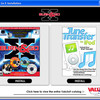
电驴资源
| 用户共享的电驴资源列表 | |
|---|---|
| [Burn.and.Go.X].burnngox.rar | 80.80 MB |
| [Burn.and.Go.X].shock.nfo | 12.02 KB |
| 80.81 MB | |
电驴资源简介
中文名: Burn and Go X发行时间: 2005年10月01日制作发行: Valusoft地区: 大陆简介:
[已通过安全检测]KV2005 病毒库:2005.10.02
[已通过安装测试]WinXP+SP2
软件版权归原作者及原软件公司所有,如果你喜欢,请购买正版软件
共享服务时间:每天:8点至23点
共享服务器:BiG BanG 6
软件名称:Burn and Go X © Valusoft
版本号: N/A
运行环境: Win9x/Me/NT/2000/XP
软件大小: 80M
软件分类: 国外软件 / 收费版 / 刻录软件
Burn Go X可以将你的数据、照片、视频、游戏、音乐等等刻录成CD或者DVD光盘,而这一切只需3个简单的步骤。
除了有一般刻录软件常用的功能外,可以将不同CD中的音轨抓出来,刻成你自己的精选专辑。
其他还有支持iPod
支持把MP3, CDA, DVD audio, WMA, OGG WAV等格式的文件刻成CD。
Release Notes:
Your Music, Your Games, Your Videos, Your Way.
Are you tired of the inadequate software that came with your CD/DVD
burner or frustrated with the complicated burning software that you
paid way too much for? Let Burn Go X s full featured burning and
labeling help you take your music on the road, protect your treasured
photos, backup vital system files, organize your videos and more.
Simplified Drag-n-Drop Burning
Burning professional-quality DVDs and CDs has never been this easy.
Pick your file, drag it to the interface and drop it.
DVD Storage Protection
Tap the immense storage capability of DVDs. Whether for data, video,
photos or backups, Burn Go X helps you store and protect your most
valuable files.
Direct Disc to Disc DVD/CD Copying
Make a duplicate of any non-protected CD or DVD copying directly from
a source CD or DVD to your recordable drive, or you can save an exact
data image of the content on your hard drive.
Create Best-Of Compilations
Grab your favorite tracks from multiple discs to create the perfect
CD for any occasion.
Professional-Quality Burning
Use Burn Go X s advanced audio filters to remove audio hiss, clicks
and pops for professional-sounding recordings every time
Built In Buffered Disc to Disc Copy Protection
Avoid buffer underruns by copying your CDs and DVDs to your hard drive
prior to copying. This is a great solution if you have an older machine
or slower drives.
File Format Translation Lets You Take Your Music Anywhere
Change file formats so you can take your favorite music files from your
desktop to your stereo. Converts MP3, CDA, DVD audio, WMA, OGG WAV
files to CD-audio and more.
Burn Data, Photo Back-up DVDs CDs
Create data CDs and DVDs that hold all of your favorite files to take
with you wherever you go. You can even create bootable DVDs and CDs
that are readable on many available operating systems.
Get the Most out of Your iPod
Have you discovered that you can t move songs from your iPod to
another authorized computer? That s because iTunes only allows you to
transfer files to your iPod. Now with Tune Transfer you can move songs
from your iPod, perform backups of your song library, recover lost
files and boost your iPod performance.
Get the Max Out of Your Media
Multi-sessioning capabilities allow you to keep adding files until
your CDs and DVDs are full.
New Dual Layer Support
Burn Go X now allows you to burn dual layer DVDs. Store up to 8.5GB
of data when burning to a dual layer DVD using a burner with dual
layer support.
Finish Your CDs DVDs with Style...Your Style.
You re the Artist
Once you ve finished burning your CDs and DVDs, it s time to add your
personal touch. Design customized labels using Burn Go X s 10,000+
cool clipart images and templates, or take it up a notch by importing
your own art, images or photos to finish your one-of-a-kind designs.
Install Notes:
Extract all files to any directory using RAR/WINRAR. Burn with
CDR-WIN or compatible software.
[已通过安全检测]KV2005 病毒库:2005.10.02
[已通过安装测试]WinXP+SP2
软件版权归原作者及原软件公司所有,如果你喜欢,请购买正版软件
共享服务时间:每天:8点至23点
共享服务器:BiG BanG 6
软件名称:Burn and Go X © Valusoft
版本号: N/A
运行环境: Win9x/Me/NT/2000/XP
软件大小: 80M
软件分类: 国外软件 / 收费版 / 刻录软件
Burn Go X可以将你的数据、照片、视频、游戏、音乐等等刻录成CD或者DVD光盘,而这一切只需3个简单的步骤。
除了有一般刻录软件常用的功能外,可以将不同CD中的音轨抓出来,刻成你自己的精选专辑。
其他还有支持iPod
支持把MP3, CDA, DVD audio, WMA, OGG WAV等格式的文件刻成CD。
Release Notes:
Your Music, Your Games, Your Videos, Your Way.
Are you tired of the inadequate software that came with your CD/DVD
burner or frustrated with the complicated burning software that you
paid way too much for? Let Burn Go X s full featured burning and
labeling help you take your music on the road, protect your treasured
photos, backup vital system files, organize your videos and more.
Simplified Drag-n-Drop Burning
Burning professional-quality DVDs and CDs has never been this easy.
Pick your file, drag it to the interface and drop it.
DVD Storage Protection
Tap the immense storage capability of DVDs. Whether for data, video,
photos or backups, Burn Go X helps you store and protect your most
valuable files.
Direct Disc to Disc DVD/CD Copying
Make a duplicate of any non-protected CD or DVD copying directly from
a source CD or DVD to your recordable drive, or you can save an exact
data image of the content on your hard drive.
Create Best-Of Compilations
Grab your favorite tracks from multiple discs to create the perfect
CD for any occasion.
Professional-Quality Burning
Use Burn Go X s advanced audio filters to remove audio hiss, clicks
and pops for professional-sounding recordings every time
Built In Buffered Disc to Disc Copy Protection
Avoid buffer underruns by copying your CDs and DVDs to your hard drive
prior to copying. This is a great solution if you have an older machine
or slower drives.
File Format Translation Lets You Take Your Music Anywhere
Change file formats so you can take your favorite music files from your
desktop to your stereo. Converts MP3, CDA, DVD audio, WMA, OGG WAV
files to CD-audio and more.
Burn Data, Photo Back-up DVDs CDs
Create data CDs and DVDs that hold all of your favorite files to take
with you wherever you go. You can even create bootable DVDs and CDs
that are readable on many available operating systems.
Get the Most out of Your iPod
Have you discovered that you can t move songs from your iPod to
another authorized computer? That s because iTunes only allows you to
transfer files to your iPod. Now with Tune Transfer you can move songs
from your iPod, perform backups of your song library, recover lost
files and boost your iPod performance.
Get the Max Out of Your Media
Multi-sessioning capabilities allow you to keep adding files until
your CDs and DVDs are full.
New Dual Layer Support
Burn Go X now allows you to burn dual layer DVDs. Store up to 8.5GB
of data when burning to a dual layer DVD using a burner with dual
layer support.
Finish Your CDs DVDs with Style...Your Style.
You re the Artist
Once you ve finished burning your CDs and DVDs, it s time to add your
personal touch. Design customized labels using Burn Go X s 10,000+
cool clipart images and templates, or take it up a notch by importing
your own art, images or photos to finish your one-of-a-kind designs.
Install Notes:
Extract all files to any directory using RAR/WINRAR. Burn with
CDR-WIN or compatible software.