
《3D展示工具》(Graphisoft Virtual Building Explorer v1.0.6690 For Archicad 12)[压缩包]
电驴资源
| 用户共享的电驴资源列表 | |
|---|---|
| Virtual.Building.Explorer.v1.0.6690.For.Archicad.12-ENGiNE.zip | 7.51 MB |
| 7.51 MB | |
电驴资源简介
中文名: 3D展示工具英文名: Graphisoft Virtual Building Explorer v1.0.6690 For Archicad 12资源格式: 压缩包制作发行: Graphisoft地区: 美国语言: 英文简介:

官方网站 http://www.graphisoft.com
中文网站 http://www.archicad.net.cn/virtual_building_explorer.asp
使用手册 http://www.archicad.net.cn/datum/vbe-userguide.pdf
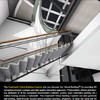
Grphisoft virtual Building Explorer 是一个为建筑师开发的革命性的、交互式3D展示工具,它为设计的交流和展示设立了新标准
游览
Virtual Building Explorer向客户提供了专业而动人的追踪模型。
使用Graphisoft Virtual Building Explorer 和ArchiCAD,建筑师可以比以前更清楚的看到他们的设计项目。
在建筑设计中实时的3D浏览—增强的立体视图模式,重力响应,图层控制,飞行模式,出口识别和预存的行进模式等带来极限的设计展示。
元素信息-表面饰层、体积、尺寸和数量-也可以通过单击鼠标来显示,实时游览时也可以得到准确的测量信息,用以支持设计决策并预测设计相关费用.
交流
Virtual Buildiing Explorer利于更好的项目交流
VB Explorer提供了与灰度、隐藏线或者边缘-轮廓线表现模式相结合的光影模式、Open-GL或全局照明视图模式,用于最终的设计理解和交流。
可以设置太阳高度和方位角;摄像机高度和视锥以及图像亮度和透明度来用于更专业的项目展示和设计交流.
共享
Virtual Building Explorer可以实现与异地用户之间的交互式磋商
不用安装和学习新软件就可以与任何人分享你的设计意图和建筑项目。
在设计的任何阶段,所有的股东、客户、顾问、施工方等等,可以在一个用户友好型的3D游览环境中浏览并完全理解整个建筑项目的设计。而且所有这些都无需得到Graphisoft ArchiCAD 或者Virtual Building Explorer的许可
NFO:
代码
² ² ° ° ²
² ²° ° ²²
²²² ²² ° ²²
²²° ²² ° ²° ²²°
²² ² ² ²²²² ²° °²²²²°°²² ²
²² ²² ²² ° ° ²²
²²° ²²°²² ²²² ² ²² ° ² ° ²²²² ²² ²²
²² ²²°²² ±±± °± ±±±± ² ²²
²² ² ²² °°° ² ²²°±²²²²²²² °°°° ² ²²
²² ²² ² ²² ²²²² °² ² ²² ² ²²
²²²² ² ²² ±±±± °°² ²² ²²
² ² °°°° ±² ² ²
°² ² ²
° ° ² ° ² °
± ² ²° ± ² ±
² ° ²²² ²²°² ²
² ±±±iks.²²°²² ²
°°°!TITAN.
°°
±± ² °°°
² ² ±±±
² ²² ²²²
²°²²°°°°²²°°°°°°°² °²²°² ° ²°² ° °°°°°°°°°°°°°°°°°°°°°°°²²
²² ²² ²²
° ² ..PROUDLY PRESENTS ²²
² ²²
² Virtual.Building.Explorer.v1.0.6690.For,Archicad.12-ENGiNE ²²
±² ²
± ±±±
° ² °°°
° ² ²²
² ²
²
² °
²±°
²²²
²²²
²²
Supplier Team ENGiNE Rlz date 13.03.2009
² Packager Team ENGiNE Archives 02 x 5.00
Cracker Team ENGiNE Protec. License ²
±
°°° INFORMATIONS °
² ±±±
² ²²² Operating System Winall
° Lang US
² Genre Cracked
²
²
Explore
Virtual Building Explorer for captivating
presentations for clients Using
Graphisoft Virtual Building Explorer and
ArchiCAD architects and designers can explore
their project designs with greater clarity
than ever before.
Real-time 3D navigation in an architectural design
- enhanced with gravity, layer control, fly-mode
egress recognition and pre-saved walkthroughs for
the ultimate design exploration.
Element information - surface finishes, volumes
sizes and quantities - can also be displayed with
a click of the mouse. Exact measurements can be
taken during the real-time walkthrough to help design
decisions and forecast cost related design issues.
Communicate
Virtual Building Explorer for better project
communication.
VB Explorer provides shaded, Open-GL or
Global Illumination view styles combined
with grayscale, hidden-line or edge-outlined
presentation modes for the ultimate design
understanding and communication.
The Sun altitude and azimuth; the camera height
and viewing cone as well as the image brightness
and transparency can be altered for professional
project presentation and design communication.
Share your design intent and the architectural project
with virtually anyone without installing any application
or learning any new software.
All stakeholders - clients, consultants, builders, etc.
- can explore and fully understand the entire architectural
project design at any stage of the design development
process
in a user friendly 3D navigation environment.
And all this without the need to hold a license of
Graphisoft
ArchiCAD or Virtual Building Explorer!
INSTALLATION
°
²
²
²
Install software, Go to ENGiNE and copy
VBE_LicenseManager.exe into original folder
default C Program FilesGraphisoftVirtual Building
Explorer
VBE.exe into original folder
default C Program FilesGraphisoftVirtual Building
Explorer
Engine.zzz into original folder
default C Program FilesGraphisoftVirtual Building
ExplorerSystem
VirtualBuildingExplorer.apx into original folder
default ArchiCAD 12Add-OnsVirtual Building Export
GREETINGS
°
²
²
²
TBE - RSSD - DVT - LND - MAGNiTUDE - BBL
² ENGiNE NEWS
²
²
²
²
²²
±±
°°
²
.ASSKEY
iks aka irokos
TiTAN Artdivision
下载链接来自sharevirus
未经过安装测试与安全检测,使用者后果自负与本论坛无关
软体版权归原作者及其公司所有,如果你喜欢,请购买正版
官方网站 http://www.graphisoft.com
中文网站 http://www.archicad.net.cn/virtual_building_explorer.asp
使用手册 http://www.archicad.net.cn/datum/vbe-userguide.pdf
Grphisoft virtual Building Explorer 是一个为建筑师开发的革命性的、交互式3D展示工具,它为设计的交流和展示设立了新标准
游览
Virtual Building Explorer向客户提供了专业而动人的追踪模型。
使用Graphisoft Virtual Building Explorer 和ArchiCAD,建筑师可以比以前更清楚的看到他们的设计项目。
在建筑设计中实时的3D浏览—增强的立体视图模式,重力响应,图层控制,飞行模式,出口识别和预存的行进模式等带来极限的设计展示。
元素信息-表面饰层、体积、尺寸和数量-也可以通过单击鼠标来显示,实时游览时也可以得到准确的测量信息,用以支持设计决策并预测设计相关费用.
交流
Virtual Buildiing Explorer利于更好的项目交流
VB Explorer提供了与灰度、隐藏线或者边缘-轮廓线表现模式相结合的光影模式、Open-GL或全局照明视图模式,用于最终的设计理解和交流。
可以设置太阳高度和方位角;摄像机高度和视锥以及图像亮度和透明度来用于更专业的项目展示和设计交流.
共享
Virtual Building Explorer可以实现与异地用户之间的交互式磋商
不用安装和学习新软件就可以与任何人分享你的设计意图和建筑项目。
在设计的任何阶段,所有的股东、客户、顾问、施工方等等,可以在一个用户友好型的3D游览环境中浏览并完全理解整个建筑项目的设计。而且所有这些都无需得到Graphisoft ArchiCAD 或者Virtual Building Explorer的许可
NFO:
代码
² ² ° ° ²
² ²° ° ²²
²²² ²² ° ²²
²²° ²² ° ²° ²²°
²² ² ² ²²²² ²° °²²²²°°²² ²
²² ²² ²² ° ° ²²
²²° ²²°²² ²²² ² ²² ° ² ° ²²²² ²² ²²
²² ²²°²² ±±± °± ±±±± ² ²²
²² ² ²² °°° ² ²²°±²²²²²²² °°°° ² ²²
²² ²² ² ²² ²²²² °² ² ²² ² ²²
²²²² ² ²² ±±±± °°² ²² ²²
² ² °°°° ±² ² ²
°² ² ²
° ° ² ° ² °
± ² ²° ± ² ±
² ° ²²² ²²°² ²
² ±±±iks.²²°²² ²
°°°!TITAN.
°°
±± ² °°°
² ² ±±±
² ²² ²²²
²°²²°°°°²²°°°°°°°² °²²°² ° ²°² ° °°°°°°°°°°°°°°°°°°°°°°°²²
²² ²² ²²
° ² ..PROUDLY PRESENTS ²²
² ²²
² Virtual.Building.Explorer.v1.0.6690.For,Archicad.12-ENGiNE ²²
±² ²
± ±±±
° ² °°°
° ² ²²
² ²
²
² °
²±°
²²²
²²²
²²
Supplier Team ENGiNE Rlz date 13.03.2009
² Packager Team ENGiNE Archives 02 x 5.00
Cracker Team ENGiNE Protec. License ²
±
°°° INFORMATIONS °
² ±±±
² ²²² Operating System Winall
° Lang US
² Genre Cracked
²
²
Explore
Virtual Building Explorer for captivating
presentations for clients Using
Graphisoft Virtual Building Explorer and
ArchiCAD architects and designers can explore
their project designs with greater clarity
than ever before.
Real-time 3D navigation in an architectural design
- enhanced with gravity, layer control, fly-mode
egress recognition and pre-saved walkthroughs for
the ultimate design exploration.
Element information - surface finishes, volumes
sizes and quantities - can also be displayed with
a click of the mouse. Exact measurements can be
taken during the real-time walkthrough to help design
decisions and forecast cost related design issues.
Communicate
Virtual Building Explorer for better project
communication.
VB Explorer provides shaded, Open-GL or
Global Illumination view styles combined
with grayscale, hidden-line or edge-outlined
presentation modes for the ultimate design
understanding and communication.
The Sun altitude and azimuth; the camera height
and viewing cone as well as the image brightness
and transparency can be altered for professional
project presentation and design communication.
Share your design intent and the architectural project
with virtually anyone without installing any application
or learning any new software.
All stakeholders - clients, consultants, builders, etc.
- can explore and fully understand the entire architectural
project design at any stage of the design development
process
in a user friendly 3D navigation environment.
And all this without the need to hold a license of
Graphisoft
ArchiCAD or Virtual Building Explorer!
INSTALLATION
°
²
²
²
Install software, Go to ENGiNE and copy
VBE_LicenseManager.exe into original folder
default C Program FilesGraphisoftVirtual Building
Explorer
VBE.exe into original folder
default C Program FilesGraphisoftVirtual Building
Explorer
Engine.zzz into original folder
default C Program FilesGraphisoftVirtual Building
ExplorerSystem
VirtualBuildingExplorer.apx into original folder
default ArchiCAD 12Add-OnsVirtual Building Export
GREETINGS
°
²
²
²
TBE - RSSD - DVT - LND - MAGNiTUDE - BBL
² ENGiNE NEWS
²
²
²
²
²²
±±
°°
²
.ASSKEY
iks aka irokos
TiTAN Artdivision
下载链接来自sharevirus
未经过安装测试与安全检测,使用者后果自负与本论坛无关
软体版权归原作者及其公司所有,如果你喜欢,请购买正版