
《SONY非线性编辑软件》(Sony Vegas Pro )v11.0 Build 594/595[压缩包]
电驴资源
| 用户共享的电驴资源列表 | |
|---|---|
| [SONY非线性编辑软件].Sony.Vegas.Pro.v11.0.594-595.Incl-Patch.[DI].rar | 402.68 MB |
| 402.68 MB | |
电驴资源简介
简介:
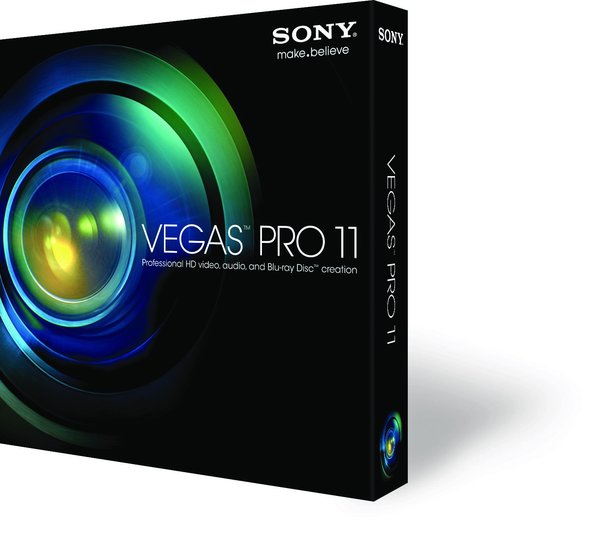
Sony Vegas 专业影像编辑软件
整合影像编辑与声音编辑功能,其中无限制的视轨与音轨,更是其他影音软件所没有的特性。在效益上更提供了视讯合成、进阶编码、转场特效、修剪、及动画控制等。不论是专业人士或是个人用户,都可因其简易的操作介面而轻松上手。此套视讯应用软件可说是数位影像、串流视讯、多媒体简报、广播等用户解决数位编辑之方案。
Vegas Pro 是面向所有专业人员的终极的多功能软件产品。他集合了 Vegas Pro 、DVD Architect Pro 和 Dolby Digital AC-3 编码软件为一个系列的套装,提供快捷的速度,强大的功能,和最大的创作效率。无论是你需要强大的视频剪辑,精确的音频控制,或者 DVD 创作的工具,Vegas Pro 都是一个完整的专业 HD 剪辑,音频编辑和 DVD 制作的产品。
Sony Vegas提供了全面的HDV, SD/HD-SDI采集、剪辑、回录支持,通过Blackmagic DeckLink 硬件板卡实现专业SDI采集支持;真14-bit 模拟4:4:4 HDTV和 SD监视器输出;支持DVI/VGA/1394外接监视器上屏;支持广播级AAF、BWF输入输出;提供VST音频插件支持等。剪辑方面提供System-wide media management、Project Nesting、Tape-style audio scrubbing、A/V ynchronization detect and repair、Improved multiprocessor support、Superior framerate conversions: HDV 1080-60i to SD 24p MPEG-2, or 1080-60i to 720-24p and 1080-24p WMV HD等新特性。其中“超级帧率转换”功能提供HDV 1080-60i到SD 24p MPEG-2和HDV 1080-60i到720-24p and 1080-24p WMV HD格式的完美转换DVD Architect 3 支持双层DVD-9、DLT、DDP、CMF等工业出版级格式。Photoshop(PSD)格式文件层支持;菜单主题输出功能可以让你保留和分析更多设计风格。智能项目文件修补功能提供更多容错设计。支持多角度视频、多语言字幕。支持CSS和Macrovision 版权保护措施。
Vegas Pro 包含能够提供最优化HD剪辑的核心技术,和 SONY AVCHD 流水线。他同时也提升了回放的效能,加强对 XDCAM 工程的支持,全新的字幕技术,提升的剪辑功能,还有更多重大的更新和功能。
精确的编辑工具
使用拖拽功能,鼠标修建功能,和‘涟漪’剪辑功能包括专业字幕技术,多方位剪辑工具,31位浮点视频处理,自定义窗口预览,增强的 HDV/SDI/XDCAM 支持,Cinescore 插件支持,A/V 同步的检波和修复,以及 auto-frame 量子化等等大量精确的工具编辑你的 SD 或者 HD 视频。
直观,专业的操作流程
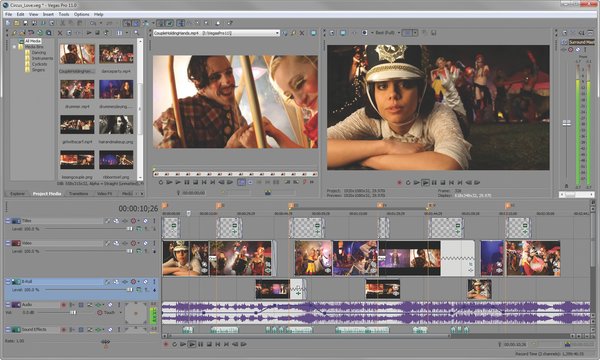
Vegas Pro 界面提供了可自定义的工作空间,达到广大创作产业所要求的标准。多窗口跨越多显示器,保存不同的界面设定以适合不同的工作要求;在时间线中嵌套Vegas工程,自定义和保存快捷键,和自定义脚本替代重复的工作。系统强大的媒体管理创造出最大的效率。网络渲染使用多电脑渲染复杂的工程以节省宝贵的时间。Vegas Pro 软件还支持 24p, HD and HDV 剪辑。
出众的音频控制
无限轨道,24-bit/192 kHz 音频,punch-in 录音(一种录音的修补技术),5.1环绕混响,音效自动控制,和压缩/延长时间。实时使用音频特效像 EQ,反相,延迟等。使用 DirectX 和 VST 音频插件扩展你的音频处理和混音选项。使用混音控制台精确调整音频属性。
强大的 DVD 工具
使用高清传输直接从时间线上烧录蓝光光盘。创建标准的多方位,多字幕,多语言和注解的 DVD。应用亮度对比度调整,自动压限,修建和反闪烁滤镜。设定 CSS 和 Macrovision 防复制技术。DVD Architect Pro 4.5 软件支持所有最新设备,包括双层 DVD 的刻录。
交互式教程
Vegas Pro 自带全面的帮助系统,也有逐步的交互式教学提供给新手学习入门。这些教学提供了简单人性化的操作流程,从而学习到需要掌握软件和完成基本任务的知识。
编辑工具上的更新! 多机位工作流程!
直观和快速地从观看你的工程来编辑你多摄像机作品中的每一个。在多大32个视频源中使用键盘快捷键或鼠标点击切换。Vegas Pro 软件保存所有未使用的镜头让你可以重新调回微调。
32位浮点视频处理!
32位浮点视频处理大大超越了传统标准的10位浮点处理。提供了更宽广的色域和更鲜艳的颜色,减少了彩条的产生和色块,光学合成修正的线光源能力,和其他更多的增强。
专业字幕插件
使用路径,预设动作,和高级设置创建动态文字效果。可以添加投影,发光,模糊和变形等特效。支持 Unicode 和 TrueType 文字,也支持 OpenType 字库的调整字距,预设样式,连写,自定义距离等等。
数字标识支持!
Vegas Pro 支持最新的数字标识,让创作视频变得更加简单。拍摄展示目录的时候,许多三脚架有摄像机倾斜度为90度的选择。使用 Vegas Pro ,你可以使用工程属性中视频标签里面新的‘旋转’设置,也可以使用媒体属性窗口里面的‘旋转’设置来编辑这种格式。为了能够快速和简单地旋转源媒体, Vegas Pro 可以不旋转工程的输出来渲染存在的宽屏幕格式提供给垂直的显示器。
更多的音频控制 混音控制台!
新的混音控制台效仿复杂的硬件控制台来混音,分配音效,和自动控制。自定义你的控制台的视图和所有轨道的讯息以及总线控制-包括音效输出-让你的混音更加和创造性!
更多关于 DVD 刻录 专业的 DVD 视图和设计
创作菜单和单标题 DVD,使用背景,动态菜单,按钮,文字和特效。设置带段落的列表,导入 PSD 文件作为背景,按钮,遮罩和图形。
蓝光光盘烧录
使用 Vegas Pro ,你可以从时间线中直接烧录到蓝光光盘中。蓝光光盘允许你创建ige类似‘独立电影’的 DVD-电影中没有标题,菜单和按钮。在 Vegas Pro 的蓝光烧录中,软件提供了预设的选项给高清目录。你还可以制作出可以在 PS3 中播放的高清光盘。
关键帧和转场
添加关键帧到 DVD Architect Pro 的时间线中,使项目如按钮和图形可以活动起来。你也可以通过关键帧控制画面的裁剪。
Cinescore 插件
如果你安装了 Cinescore 软件,你可以直接在 DVD Architect Pro 界面中使用他来为你的 DVD 目录生成背景音乐。
级别控制
在 DVD Architect Pro 中你可以控制光盘的不同的级别。
DVD-R DL 支持 幻灯片动画
自动为你的幻灯片图片裁剪和缩放至同一标准。


=========================================
下载链接来自sharevirus,
未经过安装测试与安全检测,使用者后果自负与本论坛无关
软体版权归原作者及其公司所有,如果你喜欢,请购买正版
=========================================
Sony Vegas PRO - professional program for multitrack recording, editing and assembling video and audio streams. Tools contained in 'Vegas Pro', allow editing and processing in real-time formats, DV, AVCHD, HDV, SD / HD-SDI and XDCAM, a precise adjustment of audio, the creation of surround sound and dual-layer DVD. You can burn Blu-ray discs directly from timeline to preserve records in high quality. Creating a standard DVD with a sophisticated video, subtitles, multilingual menu and add comments there is no trouble.
Opportunities Vegas Movie Studio:
• Edit video in nearly any format including HDV and AVCHD. Quick view multimedia devices, and import files into the program without conversion.
• Edit video in real time with the preservation of information. Now, no matter what changes you make to your video and photos, the original files remain intact.
• Automated and color-correction tools further enhance tsvea and unimpressive shots, eliminate differences in the color balance of the video.
• The technology of image stabilization to compensate for jitter and displacement chamber, over 400 professional 2D and 3D video effects, titles and filters.
• Tool White Balance will help set up the correct color by automatically adjusting color video.
• Ability to work simultaneously with standard-definition video and high-definition video in a single project.
• View the effects and transitions in real time at full resolution on a computer monitor or on a secondary monitor.
• Slide Show enables you to quickly create dynamic slide show of images set in a few simple clicks.
• Burn DVD and Blu-ray discs directly from the timeline.
• Import multi-source files from camcorders, including DVD and AVCHD Handycam models.
• Using the tools of mixing and panning to create surround sound.
• Encode AC-3 stereo or 5.1, without leaving the program with built-in Dolby Digital AC-3 encoder.
• The tool Restore audio allows you to remove clicks, pops and other noise from music and audio clips to provide a high quality soundtrack for your video project.
• Change the duration and synchronization of audio and video while maintaining the highest quality sound.
Features Vegas Movie Studio HD Platinum 11:
• Add special effects, transitions, titles and music
• Zoom, pan and rotate images in video
• Create professional-looking business presentations
• Removing the effect of red eye
• Simultaneous monitoring of video on a local and an external monitor
• Unlimited use of video objects on a single track
• Built-in preview window results
• More than 500 effects, transitions and effects
• Support for VST and DirectX effects plug-ins
• Tools restore the sound
• Support for ASIO driver
• Integrated publish to YouTube
• Export directly to a portable device
• Record the finished video to VideoCD or Multimedia CD
• And much more ...
Supported formats are:
• Import: AAC, AA3, AIFF, AVI, BMP, CDA, FLAC, GIF, JPEG, MP3, MPEG-1, MPEG-2, MPEG-4, OGG, OMA, PCA, PNG, QuickTime , SND, SFA, W64, WAV, WDP, WMA, WMV
• Export: AAC, AC3, AA3, AIFF, AVC, AVI, BMP, FLAC, JPEG, LPEC, MP3, MPEG-1, MPEG-2, MPEG-4, OGG, PCA, PNG, RealMedia , TIFF, QuickTime, W64, WAV, WDP, WMA, WMV
代码Notable fixes/changes in version 11.0 Build 594/595
Improved support for the Sony XDCAM Professional Media Station XDS devices.
Added the ability to render 28 Mbps constant bit rate MainConcept AVC format.
Added the ability to drag FX packages to video track headers.
Made double-clicking the horizontal scrollbar in the effect property page zoom out as in the main timeline.
Fixed incorrect output that could occur when using GPU-accelerated Pan/Crop with rotation on large still images.
Fixed incorrect output for Clock Wipe when in 32-bit floating-point video mode without GPU acceleration.
Fixed incorrect alpha channel for Glow when running without GPU acceleration.
Fixed incorrect output for Fill Light when in 32-bit floating point video mode without GPU acceleration.
Fixed an issue that prevented HDV print to tape from functioning.
Fixed an issue that prevented rendered HDV from being used as smart render source.
Fixed an issue that could prevent rendering to VCD format using MainConcept MPEG-1 format.
Fixed an issue that could prevent the Sony AVC format from rendering 5.1 surround audio.
Fixed an issue that could prevent certain QuickTime files from displaying on an external monitor during Trimmer playback.
Fixed the ability to render to QuickTime format using the MPEG-4 Low Complexity AAC audio codec.
Fixed an instability that could occur when using 10-bit uncompressed YUV sources with GPU-accelerated video processing on some NVIDIA GPUs.
Fixed an issue that could cause jumping in stabilized media if the project being loaded used a different frame rate than the previous project.
Fixed an issue that could cause an FX automation envelope to control the wrong effect when working with plug-ins in the Mixing Console.
Fixed the ability to set a custom metronome sound.
Fixed pixel aspect ratio handling with the GPU-accelerated Linear Blur effect.
Fixed alpha-channel handling in the GPU-accelerated Levels effect.
Fixed alpha channel handling in the GPU-accelerated HSL Adjust effect.
Fixed the text background for the GPU-accelerated Timecode to use solid black instead of transparent alpha.
Fixed an issue that could cause the GPU-accelerated White Balance effect to create colors slightly off.
Fixed a crash that could occur when using certain third-party compositor plug-ins if there was an audio track directly below the video track with the compositor.
Fixed the default preset for the Timecode effect to be lower-right.
Fixed crashes that could occur in the Titles Text generator.
GPU-accelerated Cookie Cutter and Page Loop are causing issues with the latest AMD OpenCL drivers Catalyst 11.12 and 12.1 so we are no longer processing these with the GPU on that platform.
Sony Vegas 专业影像编辑软件
整合影像编辑与声音编辑功能,其中无限制的视轨与音轨,更是其他影音软件所没有的特性。在效益上更提供了视讯合成、进阶编码、转场特效、修剪、及动画控制等。不论是专业人士或是个人用户,都可因其简易的操作介面而轻松上手。此套视讯应用软件可说是数位影像、串流视讯、多媒体简报、广播等用户解决数位编辑之方案。
Vegas Pro 是面向所有专业人员的终极的多功能软件产品。他集合了 Vegas Pro 、DVD Architect Pro 和 Dolby Digital AC-3 编码软件为一个系列的套装,提供快捷的速度,强大的功能,和最大的创作效率。无论是你需要强大的视频剪辑,精确的音频控制,或者 DVD 创作的工具,Vegas Pro 都是一个完整的专业 HD 剪辑,音频编辑和 DVD 制作的产品。
Sony Vegas提供了全面的HDV, SD/HD-SDI采集、剪辑、回录支持,通过Blackmagic DeckLink 硬件板卡实现专业SDI采集支持;真14-bit 模拟4:4:4 HDTV和 SD监视器输出;支持DVI/VGA/1394外接监视器上屏;支持广播级AAF、BWF输入输出;提供VST音频插件支持等。剪辑方面提供System-wide media management、Project Nesting、Tape-style audio scrubbing、A/V ynchronization detect and repair、Improved multiprocessor support、Superior framerate conversions: HDV 1080-60i to SD 24p MPEG-2, or 1080-60i to 720-24p and 1080-24p WMV HD等新特性。其中“超级帧率转换”功能提供HDV 1080-60i到SD 24p MPEG-2和HDV 1080-60i到720-24p and 1080-24p WMV HD格式的完美转换DVD Architect 3 支持双层DVD-9、DLT、DDP、CMF等工业出版级格式。Photoshop(PSD)格式文件层支持;菜单主题输出功能可以让你保留和分析更多设计风格。智能项目文件修补功能提供更多容错设计。支持多角度视频、多语言字幕。支持CSS和Macrovision 版权保护措施。
Vegas Pro 包含能够提供最优化HD剪辑的核心技术,和 SONY AVCHD 流水线。他同时也提升了回放的效能,加强对 XDCAM 工程的支持,全新的字幕技术,提升的剪辑功能,还有更多重大的更新和功能。
精确的编辑工具
使用拖拽功能,鼠标修建功能,和‘涟漪’剪辑功能包括专业字幕技术,多方位剪辑工具,31位浮点视频处理,自定义窗口预览,增强的 HDV/SDI/XDCAM 支持,Cinescore 插件支持,A/V 同步的检波和修复,以及 auto-frame 量子化等等大量精确的工具编辑你的 SD 或者 HD 视频。
直观,专业的操作流程
Vegas Pro 界面提供了可自定义的工作空间,达到广大创作产业所要求的标准。多窗口跨越多显示器,保存不同的界面设定以适合不同的工作要求;在时间线中嵌套Vegas工程,自定义和保存快捷键,和自定义脚本替代重复的工作。系统强大的媒体管理创造出最大的效率。网络渲染使用多电脑渲染复杂的工程以节省宝贵的时间。Vegas Pro 软件还支持 24p, HD and HDV 剪辑。
出众的音频控制
无限轨道,24-bit/192 kHz 音频,punch-in 录音(一种录音的修补技术),5.1环绕混响,音效自动控制,和压缩/延长时间。实时使用音频特效像 EQ,反相,延迟等。使用 DirectX 和 VST 音频插件扩展你的音频处理和混音选项。使用混音控制台精确调整音频属性。
强大的 DVD 工具
使用高清传输直接从时间线上烧录蓝光光盘。创建标准的多方位,多字幕,多语言和注解的 DVD。应用亮度对比度调整,自动压限,修建和反闪烁滤镜。设定 CSS 和 Macrovision 防复制技术。DVD Architect Pro 4.5 软件支持所有最新设备,包括双层 DVD 的刻录。
交互式教程
Vegas Pro 自带全面的帮助系统,也有逐步的交互式教学提供给新手学习入门。这些教学提供了简单人性化的操作流程,从而学习到需要掌握软件和完成基本任务的知识。
编辑工具上的更新! 多机位工作流程!
直观和快速地从观看你的工程来编辑你多摄像机作品中的每一个。在多大32个视频源中使用键盘快捷键或鼠标点击切换。Vegas Pro 软件保存所有未使用的镜头让你可以重新调回微调。
32位浮点视频处理!
32位浮点视频处理大大超越了传统标准的10位浮点处理。提供了更宽广的色域和更鲜艳的颜色,减少了彩条的产生和色块,光学合成修正的线光源能力,和其他更多的增强。
专业字幕插件
使用路径,预设动作,和高级设置创建动态文字效果。可以添加投影,发光,模糊和变形等特效。支持 Unicode 和 TrueType 文字,也支持 OpenType 字库的调整字距,预设样式,连写,自定义距离等等。
数字标识支持!
Vegas Pro 支持最新的数字标识,让创作视频变得更加简单。拍摄展示目录的时候,许多三脚架有摄像机倾斜度为90度的选择。使用 Vegas Pro ,你可以使用工程属性中视频标签里面新的‘旋转’设置,也可以使用媒体属性窗口里面的‘旋转’设置来编辑这种格式。为了能够快速和简单地旋转源媒体, Vegas Pro 可以不旋转工程的输出来渲染存在的宽屏幕格式提供给垂直的显示器。
更多的音频控制 混音控制台!
新的混音控制台效仿复杂的硬件控制台来混音,分配音效,和自动控制。自定义你的控制台的视图和所有轨道的讯息以及总线控制-包括音效输出-让你的混音更加和创造性!
更多关于 DVD 刻录 专业的 DVD 视图和设计
创作菜单和单标题 DVD,使用背景,动态菜单,按钮,文字和特效。设置带段落的列表,导入 PSD 文件作为背景,按钮,遮罩和图形。
蓝光光盘烧录
使用 Vegas Pro ,你可以从时间线中直接烧录到蓝光光盘中。蓝光光盘允许你创建ige类似‘独立电影’的 DVD-电影中没有标题,菜单和按钮。在 Vegas Pro 的蓝光烧录中,软件提供了预设的选项给高清目录。你还可以制作出可以在 PS3 中播放的高清光盘。
关键帧和转场
添加关键帧到 DVD Architect Pro 的时间线中,使项目如按钮和图形可以活动起来。你也可以通过关键帧控制画面的裁剪。
Cinescore 插件
如果你安装了 Cinescore 软件,你可以直接在 DVD Architect Pro 界面中使用他来为你的 DVD 目录生成背景音乐。
级别控制
在 DVD Architect Pro 中你可以控制光盘的不同的级别。
DVD-R DL 支持 幻灯片动画
自动为你的幻灯片图片裁剪和缩放至同一标准。
=========================================
下载链接来自sharevirus,
未经过安装测试与安全检测,使用者后果自负与本论坛无关
软体版权归原作者及其公司所有,如果你喜欢,请购买正版
=========================================
Sony Vegas PRO - professional program for multitrack recording, editing and assembling video and audio streams. Tools contained in 'Vegas Pro', allow editing and processing in real-time formats, DV, AVCHD, HDV, SD / HD-SDI and XDCAM, a precise adjustment of audio, the creation of surround sound and dual-layer DVD. You can burn Blu-ray discs directly from timeline to preserve records in high quality. Creating a standard DVD with a sophisticated video, subtitles, multilingual menu and add comments there is no trouble.
Opportunities Vegas Movie Studio:
• Edit video in nearly any format including HDV and AVCHD. Quick view multimedia devices, and import files into the program without conversion.
• Edit video in real time with the preservation of information. Now, no matter what changes you make to your video and photos, the original files remain intact.
• Automated and color-correction tools further enhance tsvea and unimpressive shots, eliminate differences in the color balance of the video.
• The technology of image stabilization to compensate for jitter and displacement chamber, over 400 professional 2D and 3D video effects, titles and filters.
• Tool White Balance will help set up the correct color by automatically adjusting color video.
• Ability to work simultaneously with standard-definition video and high-definition video in a single project.
• View the effects and transitions in real time at full resolution on a computer monitor or on a secondary monitor.
• Slide Show enables you to quickly create dynamic slide show of images set in a few simple clicks.
• Burn DVD and Blu-ray discs directly from the timeline.
• Import multi-source files from camcorders, including DVD and AVCHD Handycam models.
• Using the tools of mixing and panning to create surround sound.
• Encode AC-3 stereo or 5.1, without leaving the program with built-in Dolby Digital AC-3 encoder.
• The tool Restore audio allows you to remove clicks, pops and other noise from music and audio clips to provide a high quality soundtrack for your video project.
• Change the duration and synchronization of audio and video while maintaining the highest quality sound.
Features Vegas Movie Studio HD Platinum 11:
• Add special effects, transitions, titles and music
• Zoom, pan and rotate images in video
• Create professional-looking business presentations
• Removing the effect of red eye
• Simultaneous monitoring of video on a local and an external monitor
• Unlimited use of video objects on a single track
• Built-in preview window results
• More than 500 effects, transitions and effects
• Support for VST and DirectX effects plug-ins
• Tools restore the sound
• Support for ASIO driver
• Integrated publish to YouTube
• Export directly to a portable device
• Record the finished video to VideoCD or Multimedia CD
• And much more ...
Supported formats are:
• Import: AAC, AA3, AIFF, AVI, BMP, CDA, FLAC, GIF, JPEG, MP3, MPEG-1, MPEG-2, MPEG-4, OGG, OMA, PCA, PNG, QuickTime , SND, SFA, W64, WAV, WDP, WMA, WMV
• Export: AAC, AC3, AA3, AIFF, AVC, AVI, BMP, FLAC, JPEG, LPEC, MP3, MPEG-1, MPEG-2, MPEG-4, OGG, PCA, PNG, RealMedia , TIFF, QuickTime, W64, WAV, WDP, WMA, WMV
代码Notable fixes/changes in version 11.0 Build 594/595
Improved support for the Sony XDCAM Professional Media Station XDS devices.
Added the ability to render 28 Mbps constant bit rate MainConcept AVC format.
Added the ability to drag FX packages to video track headers.
Made double-clicking the horizontal scrollbar in the effect property page zoom out as in the main timeline.
Fixed incorrect output that could occur when using GPU-accelerated Pan/Crop with rotation on large still images.
Fixed incorrect output for Clock Wipe when in 32-bit floating-point video mode without GPU acceleration.
Fixed incorrect alpha channel for Glow when running without GPU acceleration.
Fixed incorrect output for Fill Light when in 32-bit floating point video mode without GPU acceleration.
Fixed an issue that prevented HDV print to tape from functioning.
Fixed an issue that prevented rendered HDV from being used as smart render source.
Fixed an issue that could prevent rendering to VCD format using MainConcept MPEG-1 format.
Fixed an issue that could prevent the Sony AVC format from rendering 5.1 surround audio.
Fixed an issue that could prevent certain QuickTime files from displaying on an external monitor during Trimmer playback.
Fixed the ability to render to QuickTime format using the MPEG-4 Low Complexity AAC audio codec.
Fixed an instability that could occur when using 10-bit uncompressed YUV sources with GPU-accelerated video processing on some NVIDIA GPUs.
Fixed an issue that could cause jumping in stabilized media if the project being loaded used a different frame rate than the previous project.
Fixed an issue that could cause an FX automation envelope to control the wrong effect when working with plug-ins in the Mixing Console.
Fixed the ability to set a custom metronome sound.
Fixed pixel aspect ratio handling with the GPU-accelerated Linear Blur effect.
Fixed alpha-channel handling in the GPU-accelerated Levels effect.
Fixed alpha channel handling in the GPU-accelerated HSL Adjust effect.
Fixed the text background for the GPU-accelerated Timecode to use solid black instead of transparent alpha.
Fixed an issue that could cause the GPU-accelerated White Balance effect to create colors slightly off.
Fixed a crash that could occur when using certain third-party compositor plug-ins if there was an audio track directly below the video track with the compositor.
Fixed the default preset for the Timecode effect to be lower-right.
Fixed crashes that could occur in the Titles Text generator.
GPU-accelerated Cookie Cutter and Page Loop are causing issues with the latest AMD OpenCL drivers Catalyst 11.12 and 12.1 so we are no longer processing these with the GPU on that platform.