
《文件夹和注册表分析工具》(Blue Project SysTracer Pro)v2.0.0.32/x86+x64/含注册码[压缩包]
电驴资源
| 用户共享的电驴资源列表 | |
|---|---|
| [文件夹和注册表分析工具].Blue.Project.SysTracer.Pro.v2.0.0.32.x86.x64-ArCADE.zip | 1.25 MB |
| 1.25 MB | |
电驴资源简介
简介:

软件类型:软件 系统工具
软件性质:破解软件
操作系统:Windows
应用平台:Windows XP, 2003, Vista, 2008, Windows 7, XP 64-bit, Vista 64-bit, Windows 7 64-bit
问题反馈: http://www.blueproject.ro/support
网站链接: http://www.blueproject.ro/systracer
软件介绍:
引用73B1-D601-BA81-38EA软件简介:SysTracer是一款能把文件夹、文件列表及注册表作快照的工具,可以把快照输出为HTML.
SysTracer 这是一款可以分析你的计算机文件,文件夹和注册表项目改变的系统实用工具。你可以在任何想要的时间获取无数个屏幕快照。你可以比较任何一对想要的屏幕快照,并且观察其间的不同之处。获取屏幕快照通常会持续几分钟的时间,这取决于文件和文件夹的数量和注册表项目的总数。该软件特别推出一个非常高效的分析算法,比较两张屏幕快照可以瞬间完成。
SysTracer v2.2: trace your system changes
SysTracer is a system utility tool that can scan and analyze your computer to find changed (added, modified or deleted) data into registry and files.
SysTracer can scan your system and record information about:
* changed files and folders
* modified registry entries
* system services
* system drivers
* applications that are configured to run at computer startup
* running processes
* loaded dlls
Each scan operation performed with SysTracer generates a binary image file representing a snapshot of your system.
Recording the snapshot usually takes a few minutes depending on your system complexity. You can choose to scan only specific parts from folders or registry, in order to speed up the recording process.
By comparing snapshots from before and after a new program installation or execution, you can determine which files or registry entries were added, changed, or deleted.
You can create as many snapshots as you may want or need, and you can compare anytime any pair of them, having the possibility to export differences to HTML list.
SysTracer Pro
SysTracer Pro is an enhanced version of SysTracer. SysTracer Pro have advanced functionality like exporting and importing snapshots, useful in order to compare snapshots taken on different computers.
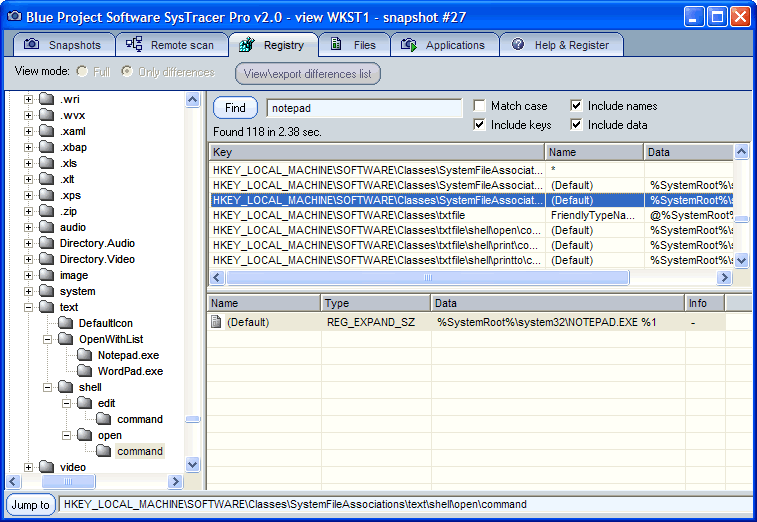
With SysTracer Pro you can search for files, folders and registry information into recorded snapshots.
SysTracer Pro have command line support, for automating recording snapshots and exporting snapshots differences.
Visit SysTracer features section for a detailed comparison matrix between SysTracer and SysTracer Pro.
Remote scanning - track changes from network computers
SysTracer have support for remote scanning, providing you an easy way to take snapshots of your network computers.
In order to allow scanning, each computer from your network will have a SysTracer executable installed as windows service.
The management of the entire process is done from a single computer (server) with a SysTracer instance running in normal desktop mode. From this server you will be able to control each SysTracer client by selecting scan targets, sending scan commands and receiving resulted snapshots.
System Requirements
* Windows XP, 2003, Vista, 2008, Windows 7, XP 64-bit, Vista 64-bit, Windows 7 64-bit
* Internet Explorer 6.0 or later



代码 ° ° °° °°°°°° °° °° °°° ° °° °
° ° °° °° °°°°°° °° °
°°°° ° °° °° °
°°°°²² ° ²² ²² °°
°°° ±± ±± ° ±± ±± ° ±± ±± °°°°
°°°° ° ° °°±±
±±°° ° ° °° ° °±±²
²±±°° ² ² °°°°°°° ² ² °°±°°° ² ° ² ° °±²²²
²²±±° °° °°°° ° °°° ° °±²²²²
±±±±°°° ° ° ±±°°±°°±±°° ° ° °° °°°°±°±°±° ° ° °°±±²±²±²±²
° °±±±° ° ° ° ° °°±°±±±°°° °°±°±±±±²±²±
²° ± °° ±°°°°° °°±°±°±°±°±±±
²± ° °² °²²² ±±
²²° ² ° ²°
²²±° ° ²²² °² ² ² ²±
²²±° °±±² ²° ° ° ²°
²±±° ²±² ±±±° ² ± ²°
±°° ±²±±±±±° ² ²² °
°°°°°°° ° ° ° ° ° °° ° ° °
°±±±°°°°°°°° °°°°°° ² ° °°°°°°° ° ° °°°±°²±
° ±°°±°±°°°° ° ° °°°° ° ° °°° ° ± ° °°°±
±±±±°±°°° ° °° ° ° °°° ° ° ° °±
²²²± °±°°°°° ° ° ° ° °° °°±±
²²²²±±±°±°±°°° ° ° ° ° °° °°²±²±²±²²²
²±²±±±°±°°°°° ° ° ° ° ° ° ° ° ° °°±±±² °±²²²²²²²²
° °°±°±±²
P R O U D L Y P R E S E N T S
Blue.Project.SysTracer.Pro.v2.0.0.32.x86.x64
PROTECTION SERIAL
SIZE ...... 01 * 1,44MB
DATE ...... 04/2010
URL........ http //www.blueproject.ro/systracer
±± ±± ±±±±±± ±±±±±± ±±±±±± ±± ±± ±±±±±° ±±±±±±
±±±± ±± ±± ±± °±±±±° ±± ±± ±± ± ±± ±± ±± ±± ±±±± °±±±±° ±± ±±
SysTracer v2.0 trace your system changes
SysTracer is a system utility tool that can scan and analyze your computer
to find changed added, modified or deleted data into registry and files.
SysTracer can scan your system and record information about
changed files and folders
modified registry entries
system services
system drivers
applications that are configured to run at computer startup
running processes
loaded dlls
Each scan operation performed with SysTracer generates a binary image file
representing a snapshot of your system.
Recording the snapshot usually takes a few minutes depending on your system
complexity. You can choose to scan only specific parts from folders or
registry, in order to speed up the recording process.
By comparing snapshots from before and after a new program installation or
execution, you can determine which files or registry entries were added,
changed, or deleted.
You can create as many snapshots as you may want or need, and you can
compare anytime any pair of them, having the possibility to export
differences to HTML list.
SysTracer Pro
SysTracer Pro is an enhanced version of SysTracer. SysTracer Pro have
advanced functionality like exporting and importing snapshots, useful in
order to compare snapshots taken on different computers.
With SysTracer Pro you can search for files, folders and registry
information into recorded snapshots.
SysTracer Pro have command line support, for automating recording snapshots
and exporting snapshots differences.
Visit SysTracer features section for a detailed comparison matrix between
SysTracer and SysTracer Pro.
Remote scanning - track changes from network computers
SysTracer have support for remote scanning, providing you an easy way to
take snapshots of your network computers.
In order to allow scanning, each computer from your network will have a
SysTracer executable installed as windows service.
The management of the entire process is done from a single computer
server with a SysTracer instance running in normal desktop mode. From
this server you will be able to control each SysTracer client by selecting
scan targets, sending scan commands and receiving resulted snapshots
±±±± ±± ±± ±±±±±° ±± ±± ±± ±±±±±± ±±±±±± ±± ±± ±± ±±±± °±±±±° ±± ±±
1 Unzip, Unrar and install
2 Register with serial
******************
3 Enjoy !
±±± ±±± °±±±±±±±° ±±± ±±±±±±±±± ±±±±±±±±° [安全检测]
★未经过安全检测
[安装测试]
★未经过安装测试,使用者后果自负与本论坛无关。
[免责声明]
★本帖介绍的文本内容转自网络,如有出入则以官方站点公布之信息为准,凡摘自网络相关图文介绍内容的本帖不另行标注出处,原创作者如有异议可提出以便删除。
★关于软件破解及注册机可能被杀毒软件报病毒或间谍木马(若已检测到的则将在帖中特别标注),请自行甄别和取舍,不另行加以解释。
★资源下载后请对文件做必要的安全检测,该下载内容仅限于个人测试学习之用,不得用于商业用途,并且请在下载后24小时内删除。
★各计算机系统环境各不相同,因此不保证该软件完全兼容于你的计算机系统,最终解决软件安装运行问题请联络官方站点寻求相关技术支持。
★凡标注为下载链接转自其他站点的,无法保证资源的供源以及资源本身等情况的完整性和可用性(不可控)。
★资源版权归作者及其公司所有,如果你喜欢,请购买正版。
软件类型:软件 系统工具
软件性质:破解软件
操作系统:Windows
应用平台:Windows XP, 2003, Vista, 2008, Windows 7, XP 64-bit, Vista 64-bit, Windows 7 64-bit
问题反馈: http://www.blueproject.ro/support
网站链接: http://www.blueproject.ro/systracer
软件介绍:
引用73B1-D601-BA81-38EA软件简介:SysTracer是一款能把文件夹、文件列表及注册表作快照的工具,可以把快照输出为HTML.
SysTracer 这是一款可以分析你的计算机文件,文件夹和注册表项目改变的系统实用工具。你可以在任何想要的时间获取无数个屏幕快照。你可以比较任何一对想要的屏幕快照,并且观察其间的不同之处。获取屏幕快照通常会持续几分钟的时间,这取决于文件和文件夹的数量和注册表项目的总数。该软件特别推出一个非常高效的分析算法,比较两张屏幕快照可以瞬间完成。
SysTracer v2.2: trace your system changes
SysTracer is a system utility tool that can scan and analyze your computer to find changed (added, modified or deleted) data into registry and files.
SysTracer can scan your system and record information about:
* changed files and folders
* modified registry entries
* system services
* system drivers
* applications that are configured to run at computer startup
* running processes
* loaded dlls
Each scan operation performed with SysTracer generates a binary image file representing a snapshot of your system.
Recording the snapshot usually takes a few minutes depending on your system complexity. You can choose to scan only specific parts from folders or registry, in order to speed up the recording process.
By comparing snapshots from before and after a new program installation or execution, you can determine which files or registry entries were added, changed, or deleted.
You can create as many snapshots as you may want or need, and you can compare anytime any pair of them, having the possibility to export differences to HTML list.
SysTracer Pro
SysTracer Pro is an enhanced version of SysTracer. SysTracer Pro have advanced functionality like exporting and importing snapshots, useful in order to compare snapshots taken on different computers.
With SysTracer Pro you can search for files, folders and registry information into recorded snapshots.
SysTracer Pro have command line support, for automating recording snapshots and exporting snapshots differences.
Visit SysTracer features section for a detailed comparison matrix between SysTracer and SysTracer Pro.
Remote scanning - track changes from network computers
SysTracer have support for remote scanning, providing you an easy way to take snapshots of your network computers.
In order to allow scanning, each computer from your network will have a SysTracer executable installed as windows service.
The management of the entire process is done from a single computer (server) with a SysTracer instance running in normal desktop mode. From this server you will be able to control each SysTracer client by selecting scan targets, sending scan commands and receiving resulted snapshots.
System Requirements
* Windows XP, 2003, Vista, 2008, Windows 7, XP 64-bit, Vista 64-bit, Windows 7 64-bit
* Internet Explorer 6.0 or later
代码 ° ° °° °°°°°° °° °° °°° ° °° °
° ° °° °° °°°°°° °° °
°°°° ° °° °° °
°°°°²² ° ²² ²² °°
°°° ±± ±± ° ±± ±± ° ±± ±± °°°°
°°°° ° ° °°±±
±±°° ° ° °° ° °±±²
²±±°° ² ² °°°°°°° ² ² °°±°°° ² ° ² ° °±²²²
²²±±° °° °°°° ° °°° ° °±²²²²
±±±±°°° ° ° ±±°°±°°±±°° ° ° °° °°°°±°±°±° ° ° °°±±²±²±²±²
° °±±±° ° ° ° ° °°±°±±±°°° °°±°±±±±²±²±
²° ± °° ±°°°°° °°±°±°±°±°±±±
²± ° °² °²²² ±±
²²° ² ° ²°
²²±° ° ²²² °² ² ² ²±
²²±° °±±² ²° ° ° ²°
²±±° ²±² ±±±° ² ± ²°
±°° ±²±±±±±° ² ²² °
°°°°°°° ° ° ° ° ° °° ° ° °
°±±±°°°°°°°° °°°°°° ² ° °°°°°°° ° ° °°°±°²±
° ±°°±°±°°°° ° ° °°°° ° ° °°° ° ± ° °°°±
±±±±°±°°° ° °° ° ° °°° ° ° ° °±
²²²± °±°°°°° ° ° ° ° °° °°±±
²²²²±±±°±°±°°° ° ° ° ° °° °°²±²±²±²²²
²±²±±±°±°°°°° ° ° ° ° ° ° ° ° ° °°±±±² °±²²²²²²²²
° °°±°±±²
P R O U D L Y P R E S E N T S
Blue.Project.SysTracer.Pro.v2.0.0.32.x86.x64
PROTECTION SERIAL
SIZE ...... 01 * 1,44MB
DATE ...... 04/2010
URL........ http //www.blueproject.ro/systracer
±± ±± ±±±±±± ±±±±±± ±±±±±± ±± ±± ±±±±±° ±±±±±±
±±±± ±± ±± ±± °±±±±° ±± ±± ±± ± ±± ±± ±± ±± ±±±± °±±±±° ±± ±±
SysTracer v2.0 trace your system changes
SysTracer is a system utility tool that can scan and analyze your computer
to find changed added, modified or deleted data into registry and files.
SysTracer can scan your system and record information about
changed files and folders
modified registry entries
system services
system drivers
applications that are configured to run at computer startup
running processes
loaded dlls
Each scan operation performed with SysTracer generates a binary image file
representing a snapshot of your system.
Recording the snapshot usually takes a few minutes depending on your system
complexity. You can choose to scan only specific parts from folders or
registry, in order to speed up the recording process.
By comparing snapshots from before and after a new program installation or
execution, you can determine which files or registry entries were added,
changed, or deleted.
You can create as many snapshots as you may want or need, and you can
compare anytime any pair of them, having the possibility to export
differences to HTML list.
SysTracer Pro
SysTracer Pro is an enhanced version of SysTracer. SysTracer Pro have
advanced functionality like exporting and importing snapshots, useful in
order to compare snapshots taken on different computers.
With SysTracer Pro you can search for files, folders and registry
information into recorded snapshots.
SysTracer Pro have command line support, for automating recording snapshots
and exporting snapshots differences.
Visit SysTracer features section for a detailed comparison matrix between
SysTracer and SysTracer Pro.
Remote scanning - track changes from network computers
SysTracer have support for remote scanning, providing you an easy way to
take snapshots of your network computers.
In order to allow scanning, each computer from your network will have a
SysTracer executable installed as windows service.
The management of the entire process is done from a single computer
server with a SysTracer instance running in normal desktop mode. From
this server you will be able to control each SysTracer client by selecting
scan targets, sending scan commands and receiving resulted snapshots
±±±± ±± ±± ±±±±±° ±± ±± ±± ±±±±±± ±±±±±± ±± ±± ±± ±±±± °±±±±° ±± ±±
1 Unzip, Unrar and install
2 Register with serial
******************
3 Enjoy !
±±± ±±± °±±±±±±±° ±±± ±±±±±±±±± ±±±±±±±±° [安全检测]
★未经过安全检测
[安装测试]
★未经过安装测试,使用者后果自负与本论坛无关。
[免责声明]
★本帖介绍的文本内容转自网络,如有出入则以官方站点公布之信息为准,凡摘自网络相关图文介绍内容的本帖不另行标注出处,原创作者如有异议可提出以便删除。
★关于软件破解及注册机可能被杀毒软件报病毒或间谍木马(若已检测到的则将在帖中特别标注),请自行甄别和取舍,不另行加以解释。
★资源下载后请对文件做必要的安全检测,该下载内容仅限于个人测试学习之用,不得用于商业用途,并且请在下载后24小时内删除。
★各计算机系统环境各不相同,因此不保证该软件完全兼容于你的计算机系统,最终解决软件安装运行问题请联络官方站点寻求相关技术支持。
★凡标注为下载链接转自其他站点的,无法保证资源的供源以及资源本身等情况的完整性和可用性(不可控)。
★资源版权归作者及其公司所有,如果你喜欢,请购买正版。