
《文件恢复工具》(Ashampoo Undeleter)v1.10[压缩包]

电驴资源
| 用户共享的电驴资源列表 | |
|---|---|
| [文件恢复工具].Ashampoo.Undeleter.v1.10-TE.zip | 9.56 MB |
| [文件恢复工具].Ashampoo.Undeleter.v1.10.Multilingual.Keygen.and.Patch.Only-BRD.zip | 104.74 KB |
| 9.66 MB | |
电驴资源简介
简介:

软件类型:软件 系统工具
软件性质:破解软件
操作系统:Windows
应用平台:Windows® XP,Windows Vista® (32 位/64 位) 和 Windows® 7 (32 位/64 位)
问题反馈: https://www.ashampoo.com/cn/rmb/sup
网站链接: https://www.ashampoo.com/cn/rmb/pin/0081/Sy...8%BF%B0
软件介绍:
Ashampoo Undeleter – 轻松恢复被删除的文件
不用再为不小心删除了文件而担心
我们的日常生活中经常使用计算机,而有时会发生灾难。如不小心删除了一张美丽的图片,一个重要的文件或是一首最爱的 MP3。
对于这些情况,Ashampoo Undeleter 就是您最好的帮手。使用这个程序,您可以随时找回已被删除的文件。
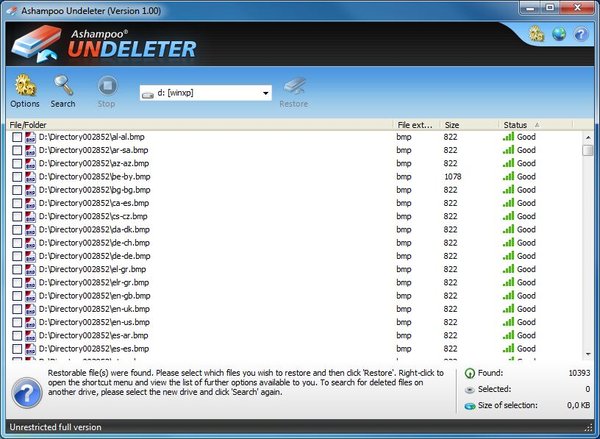
如果您再不小心删除了一首最爱的歌曲,没关系。只需要使用 Ashampoo Undeleter 的高效搜索功能,程序会生成一个已删除的文件列表。在列表中还会显示文件的状况。这显示了文件是否能被完全恢复,部分恢复或是完全不能恢复。然后您只需要轻轻一点,就能恢复您最爱的歌曲,保存到指定的位置。
Ashampoo Undeleter 的恢复功能很强大,不仅限于计算机的硬盘。USB 驱动器,U 盘或是其它移动存储设备中被删除的文件也一样能被恢复。
随时备上 Ashampoo Undeleter 是个很好的主意,下次数据出现紧急状况时就能快速恢复被删除的文件了。
重要功能一览:
恢复 NTFS 以及 FAT 12、16、32 分区上的文件和文件夹
恢复带 NTFS 压缩的分区上的文件
恢复 NTFS 加密分区上的文件
恢复 NTFS 分区上的可交换数据流(ADS)
支持 Microsoft Windows® 系统上的所有已知文件系统
超快 MFS 和 FAT 算法,极速恢复
恢复内容无限制(文件、文件夹)
评估和计算可恢复对象的状况
快捷直观的用户界面
Ashampoo Undeleter 可恢复已被删除的文件。若文件已被移到回收站并回收站已被清空,那么不使用特殊的程序是无法找到已被删除的文件的。Ashampoo Undeleter 就是这种软件,它能够检测并恢复您误删除的文件和文件夹。尽管删除后在 Windows® 中不再显示这些文件,但很多时候它们仍留在您的硬盘上,只是被 Windows 标记为该区域以后可写入。
在 Ashampoo Undeleter 中,您可以选择要搜索已删除文件的分区和驱动器。程序不光能搜索计算机上的硬盘驱动器,外置驱动器也一样能被搜索,包括 USB 闪存盘等。
Ashampoo Undeleter 搜索结果除了列出已删除的文件外,还能看到已删除文件的状况。已删除的文件可能会处于不同的状况。显示的状态会让您了解已删除的文件是否能够完全恢复,或仅仅能部分恢复,甚至完全不能恢复。
如果能恢复,只需要几下鼠标点击,Ashampoo Undeleter 将恢复已删除的文件和文件夹。此外,您能指定保存目录,如硬盘驱动器或是外置设备。
需求
操作系统:
Windows® XP,Windows Vista® (32 位/64 位) 和 Windows® 7 (32 位/64 位)
计算机:
能够以合理速度运行以上操作系统之一的任何计算机。
内存 (RAM):
内存的大小对于程序的部署没有多大影响。我们采用 Microsoft 操作系统中建议使用的值。
硬盘空间:
程序文件需要约 30 MB,备份文件还需要额外空间(最低要求)。
其他:
使用该程序需要完整的管理员权限。
代码 ▄▄ ▄ █▄▄
▄███▓▓▄ ▀█▀ ▄▄▄▄▄█████ █████
▄▄█ ███▓▀ ▄▄▄▄▓███████▀▀▀▀▀██▄███▌
███▓▌ ▄▄▄██▄██████████▀▀▄███▄ ▀████▀ ▀█▄
▐██▓▄███████████████▓▀ ▀▀▀▀█████▄▄ ▄██▌ ▐█▌
▐██▀████▀▀▀▀▄▄███▓ █▓▄ ▄▄██▓▓▓▀▀ ▀▀█▄ ▄█▀
███▓▄ ▀███▓▌ ██ ▄███▓▓▀█▌ ██▀██▄ ▀▀▀▀ ▄
▄██▀▀█▓▄ ▀██▄██▓ ▐█▌ ▐███▓▓ ▐▓ ██ ▐██▓▓▄▄ ▀▓▀
▄ ▐▓▓▌ ████▀ ░█▌ ████▓▌ █▒ ▓▓ ███▓▓▀█▄
▀▓▀ ▄▓▓▀ █▌ ▐███████▓ ████▓▓ ▐▓ ▒▒ ███▓▌ █▌ ▀▄
▄▄▓▓▀ ▄█▀ ▐███▓▌░▄█ ▐████▓▓▄█▌ ░░ ███▓▌▐█ ▐█
▄██▀█▓ ██ ▐███▓▌ ██ ▀████████ ░░ ▐██▓▓▀▀ ██▌
███▌▐▓▌ ▐█▀▀▀▄ ███▓▓ ▐█▌ ▄▀▀▀▀▀███▄ ██▓▀ ▄███▓
▀▀█▄█▓ ▐▌ ▐▌ ▓██▓▓ ▐█▓ ▀█▀▄▄▄▄ ▀██▄██▓ ▄▄██▀▀ ▀█▓▄
▀▓▓▄ ▀ ▄▄▀ ▒███▓▓▄█▓▓██▓▓▀█▀▀▄ ▀███░▄▄██▀▀ ▄▄▄▄▄▀█▓▓▄▄
▀▀▀▀ ▄▄▄██████▀▀▀█▓▓▌▐▌ ▐███▀▀ ▄▓▓▓▓█▀▀███▓▓▀
▀████▀▀▀▀ ▄▄▄▀▀▀█▓▓▄█▄ ▄█▀ ▄▓▓▀▄█▀ ▀▓▀
▄█▌ ▄▓▄ ▀ ▄▄██▀▀ ▀▀▓▓▓███▀▀ ▐█▓▌░▓▌
▄████▄ ▀ ▄▄▄██▀▀▀ ▀▓▓▄▀▓▄
▄█ ▀█▄▀████▀▀ ▀▀▀██▄▄▄█▀ █▄
▄███ ▐█▌ ▄ TE 2011 PRESENTS ▄ ▐█▌ ███▄
███ ▄█▀ ▀▓▀ ▀▓▀ ▀█▄ ███
███▀▀▀ ▄█▀ ▄█▀▀▀ ▀▀▀█▄ ▀█▄ ▀▀▀███
▄▄▄███▄▄ ▄▄ ██▄▄▄██ ANOTHER FINE RELEASE ██▄▄▄██ ▄▄ ▄▄███▄▄▄
▀█▄▄ ▄▄█▀
Release Ashampoo Undeleter v1.10 c 2011 Ashampoo
Date 11/16/2011
Cracked By Twisted EndZ
Release Type
Registration/Serial Crack
Activation Crack
Trial Crack
Server Check Crack
X Serial
Hidden/Added Features Enabler
X Other Server Check Bypass
Loader Patcher Patch Precracked X RegFile
Keygen
▄ ▄
▄▓▄ ▀▓▀ ▀▓▀ ▄▓▄
▄▓▓███▄ ▀▀▄▄▄▄ ▄▄█▀▀▀ ▀▀▀█▄▄ ▄▄▄▄▀▀ ▄███▓▓▄
▀▀▓▓█▄▀▀██▄▄▄ ▄▄▄██ RELEASE NOTES ██▄▄▄ ▄▄▄██▀▀▄█▓▓▀▀
▀▓█▄ ▄█▄ ▀█▄▄ ▄▄█▀ ▄█▄ ▄█▓▀
▄ ▐▓█▌ ▀ ▀ ▐█▓▌ ▄
▄▓▓▄▄██▀ ▀██▄▄▓▓▄
▀▀ ▀▀
Never again trouble with accidentally deleted files
In our daily lives with computers small and big disasters can
always happen. It is very annoying, if for example a beautiful
picture, an important document or favorite MP3 is lost or
accidentally deleted.
In such a situation Ashampoo Undeleter is your salvation. With
this program deleted files are recovered in next to no time.
So, if you accidentally deleted your favorite song from your PC,
this isnТt a disaster any more. Just use the effective search
function of the Ashampoo Undeleter and have the program generate
a list with all deleted files. In such a list even the condition
of the files is displayed. This shows whether the files can be
recovered completely, partly or not at all. Then you can recover
your favorite song in your desired location with just one click.
The recovery function of the Ashampoo Undeleter is extensive and
not limited to the hard disk drives of your computer. Deleted
files can also be detected and recovered on external USB drives,
USB flash drives and other storage media.
Be prepared for the next data emergency with Ashampoo Undeleter
and be able recover deleted files quickly.
Important functions at a glance
╖ Recovery of files and directories on NTFS as well as FAT 12,
16, 32 partitions
╖ Recovery of files on partitions with active NTFS compression
╖ Recovery of files on partitions with active NTFS encryption
╖ Recovery of alternate data streams ADS on NTFS partitions
╖ Support of all known file systems on Microsoft Windowsо
╖ VERY fast MFT and FAT algorithm, as well as extremely quick
recovery
╖ Unlimited recoverable objects files, directories
╖ Assessment and evaluation of the condition of recoverable
objects
╖ Quick and therefore intuitive user interface
Requirements
Operating System
╖ Windowsо XP, Windows Vistaо 32bit/64bit and Windowsо 7
32bit/64bit .
Computer
╖ Any computer that runs one of the above operating systems at a
reasonable speed.
Main Memory RAM
╖ The size of the main storage is insignificant for the
employment of the program. We refer to the recommendations of
the operating system in use from Microsoft.
Hard Drive Space
╖ 30 MB for the program files plus some additional space for
backup files minimal .
Other
╖ Full administrative rights are required to use the program.
For More Info on Ashampoo Undeleter Visit
http //www.ashampoo.com/frontend/products/php/product.php?
session_langid=2 idstring=0081
TE Release Filename taund11x.zip
▄ ▄
▄▓▄ ▀▓▀ ▀▓▀ ▄▓▄
▄▓▓███▄ ▀▀▄▄▄▄ ▄▄█▀▀▀ ▀▀▀█▄▄ ▄▄▄▄▀▀ ▄███▓▓▄
▀▀▓▓█▄▀▀██▄▄▄ ▄▄▄██ INSTALLATION NOTES ██▄▄▄ ▄▄▄██▀▀▄█▓▓▀▀
▀▓█▄ ▄█▄ ▀█▄▄ ▄▄█▀ ▄█▄ ▄█▓▀
▄ ▐▓█▌ ▀ ▀ ▐█▓▌ ▄
▄▓▓▄▄██▀ ▀██▄▄▓▓▄
▀▀ ▀▀
Install ashampoo_undeleter_1.10_sm.exe. Do not launch Ashampoo
Undeleter yet. Next import the Registration.reg file into your
registry, which can be found in the Reg folder just double click
the file . Make sure you have administator mode if you have
problems importing the regfile. Ashampoo Undeleter is now fully
registered and activated!
Thats it! Enjoy.
▄█▓▓▄ ▄ ▄ ▄▓▓█▄
▀ ▐▓▓▌ ▄▓▓▀█▀▀▀ ▀▓▀ ▀█▀ ▀▀▀█▀▓▓▄ ▐▓▓▌ ▀
▄▄▄▄▄▓▓▀ ▄ ▐▓▓▌▐▌ ▐▌▐▓▓▌ ▄ ▀▓▓▄▄▄▄▄
▄████▓▓▓▀ ▄█▓▓▄ ▀█▓▄█▄ T E 2 0 1 1 ▄█▄▓█▀ ▄▓▓█▄ ▀▓▓▓████▄
▓██▀▄▓▀ ▒ ▀█▓▓▓▓▓▄▄ ▀████▄ ▄████▀ ▄▄▓▓▓▓▓█▀ ▒ ▀▓▄▀██▓
▐██▌░▓▌ ░ ▐█▓▌ ▀▀██▓▄▄▀▀██▓ ▓██▀▀▄▄▓██▀▀ ▐▓█▌ ░ ▐▓░▐██▌
▀██▄▀▓▄ ▄█▓▓ ▀▀██▓▄██▓ ascii ▓██▄▓██▀▀ ▓▓█▄ ▄▓▀▄██▀
▀▀▓▓███▄▄█▓▓▀ ░░▒▒▓▓█▄████▓▓ by mx ▓▓████▄█▓▓▒▒░░ ▀▓▓█▄▄███▓▓▀▀
▀▀▀▀▀ ▄ ▀ ▒ ▒ ▀ ▄ ▀▀▀▀▀
▓▀▀▀▀▀▀▀ ▀▀▀▀▀ ░ ▀▀▀▀▀▀▀ ░ ▀▀▀▀▀▀▀ ▀▀▀▀▀▓
▄ Don't Hate The Hacker, Hate The Code ▀░
▀▓▄▄ ▄▄▄▄▄▄▄▄▄▄▄▄▄▄ ▄▄▄▄▄▄▄▄▄▄▄▄ ▄▄▄▄▄▄▄▄▓▀
▄ ▀▓
░ ▀
下载链接来自sharevirus
未经过安装测试与安全检测,使用者后果自负与本论坛无关
软体版权归原作者及其公司所有,如果你喜欢,请购买正版
软件类型:软件 系统工具
软件性质:破解软件
操作系统:Windows
应用平台:Windows® XP,Windows Vista® (32 位/64 位) 和 Windows® 7 (32 位/64 位)
问题反馈: https://www.ashampoo.com/cn/rmb/sup
网站链接: https://www.ashampoo.com/cn/rmb/pin/0081/Sy...8%BF%B0
软件介绍:
Ashampoo Undeleter – 轻松恢复被删除的文件
不用再为不小心删除了文件而担心
我们的日常生活中经常使用计算机,而有时会发生灾难。如不小心删除了一张美丽的图片,一个重要的文件或是一首最爱的 MP3。
对于这些情况,Ashampoo Undeleter 就是您最好的帮手。使用这个程序,您可以随时找回已被删除的文件。
如果您再不小心删除了一首最爱的歌曲,没关系。只需要使用 Ashampoo Undeleter 的高效搜索功能,程序会生成一个已删除的文件列表。在列表中还会显示文件的状况。这显示了文件是否能被完全恢复,部分恢复或是完全不能恢复。然后您只需要轻轻一点,就能恢复您最爱的歌曲,保存到指定的位置。
Ashampoo Undeleter 的恢复功能很强大,不仅限于计算机的硬盘。USB 驱动器,U 盘或是其它移动存储设备中被删除的文件也一样能被恢复。
随时备上 Ashampoo Undeleter 是个很好的主意,下次数据出现紧急状况时就能快速恢复被删除的文件了。
重要功能一览:
恢复 NTFS 以及 FAT 12、16、32 分区上的文件和文件夹
恢复带 NTFS 压缩的分区上的文件
恢复 NTFS 加密分区上的文件
恢复 NTFS 分区上的可交换数据流(ADS)
支持 Microsoft Windows® 系统上的所有已知文件系统
超快 MFS 和 FAT 算法,极速恢复
恢复内容无限制(文件、文件夹)
评估和计算可恢复对象的状况
快捷直观的用户界面
Ashampoo Undeleter 可恢复已被删除的文件。若文件已被移到回收站并回收站已被清空,那么不使用特殊的程序是无法找到已被删除的文件的。Ashampoo Undeleter 就是这种软件,它能够检测并恢复您误删除的文件和文件夹。尽管删除后在 Windows® 中不再显示这些文件,但很多时候它们仍留在您的硬盘上,只是被 Windows 标记为该区域以后可写入。
在 Ashampoo Undeleter 中,您可以选择要搜索已删除文件的分区和驱动器。程序不光能搜索计算机上的硬盘驱动器,外置驱动器也一样能被搜索,包括 USB 闪存盘等。
Ashampoo Undeleter 搜索结果除了列出已删除的文件外,还能看到已删除文件的状况。已删除的文件可能会处于不同的状况。显示的状态会让您了解已删除的文件是否能够完全恢复,或仅仅能部分恢复,甚至完全不能恢复。
如果能恢复,只需要几下鼠标点击,Ashampoo Undeleter 将恢复已删除的文件和文件夹。此外,您能指定保存目录,如硬盘驱动器或是外置设备。
需求
操作系统:
Windows® XP,Windows Vista® (32 位/64 位) 和 Windows® 7 (32 位/64 位)
计算机:
能够以合理速度运行以上操作系统之一的任何计算机。
内存 (RAM):
内存的大小对于程序的部署没有多大影响。我们采用 Microsoft 操作系统中建议使用的值。
硬盘空间:
程序文件需要约 30 MB,备份文件还需要额外空间(最低要求)。
其他:
使用该程序需要完整的管理员权限。
代码 ▄▄ ▄ █▄▄
▄███▓▓▄ ▀█▀ ▄▄▄▄▄█████ █████
▄▄█ ███▓▀ ▄▄▄▄▓███████▀▀▀▀▀██▄███▌
███▓▌ ▄▄▄██▄██████████▀▀▄███▄ ▀████▀ ▀█▄
▐██▓▄███████████████▓▀ ▀▀▀▀█████▄▄ ▄██▌ ▐█▌
▐██▀████▀▀▀▀▄▄███▓ █▓▄ ▄▄██▓▓▓▀▀ ▀▀█▄ ▄█▀
███▓▄ ▀███▓▌ ██ ▄███▓▓▀█▌ ██▀██▄ ▀▀▀▀ ▄
▄██▀▀█▓▄ ▀██▄██▓ ▐█▌ ▐███▓▓ ▐▓ ██ ▐██▓▓▄▄ ▀▓▀
▄ ▐▓▓▌ ████▀ ░█▌ ████▓▌ █▒ ▓▓ ███▓▓▀█▄
▀▓▀ ▄▓▓▀ █▌ ▐███████▓ ████▓▓ ▐▓ ▒▒ ███▓▌ █▌ ▀▄
▄▄▓▓▀ ▄█▀ ▐███▓▌░▄█ ▐████▓▓▄█▌ ░░ ███▓▌▐█ ▐█
▄██▀█▓ ██ ▐███▓▌ ██ ▀████████ ░░ ▐██▓▓▀▀ ██▌
███▌▐▓▌ ▐█▀▀▀▄ ███▓▓ ▐█▌ ▄▀▀▀▀▀███▄ ██▓▀ ▄███▓
▀▀█▄█▓ ▐▌ ▐▌ ▓██▓▓ ▐█▓ ▀█▀▄▄▄▄ ▀██▄██▓ ▄▄██▀▀ ▀█▓▄
▀▓▓▄ ▀ ▄▄▀ ▒███▓▓▄█▓▓██▓▓▀█▀▀▄ ▀███░▄▄██▀▀ ▄▄▄▄▄▀█▓▓▄▄
▀▀▀▀ ▄▄▄██████▀▀▀█▓▓▌▐▌ ▐███▀▀ ▄▓▓▓▓█▀▀███▓▓▀
▀████▀▀▀▀ ▄▄▄▀▀▀█▓▓▄█▄ ▄█▀ ▄▓▓▀▄█▀ ▀▓▀
▄█▌ ▄▓▄ ▀ ▄▄██▀▀ ▀▀▓▓▓███▀▀ ▐█▓▌░▓▌
▄████▄ ▀ ▄▄▄██▀▀▀ ▀▓▓▄▀▓▄
▄█ ▀█▄▀████▀▀ ▀▀▀██▄▄▄█▀ █▄
▄███ ▐█▌ ▄ TE 2011 PRESENTS ▄ ▐█▌ ███▄
███ ▄█▀ ▀▓▀ ▀▓▀ ▀█▄ ███
███▀▀▀ ▄█▀ ▄█▀▀▀ ▀▀▀█▄ ▀█▄ ▀▀▀███
▄▄▄███▄▄ ▄▄ ██▄▄▄██ ANOTHER FINE RELEASE ██▄▄▄██ ▄▄ ▄▄███▄▄▄
▀█▄▄ ▄▄█▀
Release Ashampoo Undeleter v1.10 c 2011 Ashampoo
Date 11/16/2011
Cracked By Twisted EndZ
Release Type
Registration/Serial Crack
Activation Crack
Trial Crack
Server Check Crack
X Serial
Hidden/Added Features Enabler
X Other Server Check Bypass
Loader Patcher Patch Precracked X RegFile
Keygen
▄ ▄
▄▓▄ ▀▓▀ ▀▓▀ ▄▓▄
▄▓▓███▄ ▀▀▄▄▄▄ ▄▄█▀▀▀ ▀▀▀█▄▄ ▄▄▄▄▀▀ ▄███▓▓▄
▀▀▓▓█▄▀▀██▄▄▄ ▄▄▄██ RELEASE NOTES ██▄▄▄ ▄▄▄██▀▀▄█▓▓▀▀
▀▓█▄ ▄█▄ ▀█▄▄ ▄▄█▀ ▄█▄ ▄█▓▀
▄ ▐▓█▌ ▀ ▀ ▐█▓▌ ▄
▄▓▓▄▄██▀ ▀██▄▄▓▓▄
▀▀ ▀▀
Never again trouble with accidentally deleted files
In our daily lives with computers small and big disasters can
always happen. It is very annoying, if for example a beautiful
picture, an important document or favorite MP3 is lost or
accidentally deleted.
In such a situation Ashampoo Undeleter is your salvation. With
this program deleted files are recovered in next to no time.
So, if you accidentally deleted your favorite song from your PC,
this isnТt a disaster any more. Just use the effective search
function of the Ashampoo Undeleter and have the program generate
a list with all deleted files. In such a list even the condition
of the files is displayed. This shows whether the files can be
recovered completely, partly or not at all. Then you can recover
your favorite song in your desired location with just one click.
The recovery function of the Ashampoo Undeleter is extensive and
not limited to the hard disk drives of your computer. Deleted
files can also be detected and recovered on external USB drives,
USB flash drives and other storage media.
Be prepared for the next data emergency with Ashampoo Undeleter
and be able recover deleted files quickly.
Important functions at a glance
╖ Recovery of files and directories on NTFS as well as FAT 12,
16, 32 partitions
╖ Recovery of files on partitions with active NTFS compression
╖ Recovery of files on partitions with active NTFS encryption
╖ Recovery of alternate data streams ADS on NTFS partitions
╖ Support of all known file systems on Microsoft Windowsо
╖ VERY fast MFT and FAT algorithm, as well as extremely quick
recovery
╖ Unlimited recoverable objects files, directories
╖ Assessment and evaluation of the condition of recoverable
objects
╖ Quick and therefore intuitive user interface
Requirements
Operating System
╖ Windowsо XP, Windows Vistaо 32bit/64bit and Windowsо 7
32bit/64bit .
Computer
╖ Any computer that runs one of the above operating systems at a
reasonable speed.
Main Memory RAM
╖ The size of the main storage is insignificant for the
employment of the program. We refer to the recommendations of
the operating system in use from Microsoft.
Hard Drive Space
╖ 30 MB for the program files plus some additional space for
backup files minimal .
Other
╖ Full administrative rights are required to use the program.
For More Info on Ashampoo Undeleter Visit
http //www.ashampoo.com/frontend/products/php/product.php?
session_langid=2 idstring=0081
TE Release Filename taund11x.zip
▄ ▄
▄▓▄ ▀▓▀ ▀▓▀ ▄▓▄
▄▓▓███▄ ▀▀▄▄▄▄ ▄▄█▀▀▀ ▀▀▀█▄▄ ▄▄▄▄▀▀ ▄███▓▓▄
▀▀▓▓█▄▀▀██▄▄▄ ▄▄▄██ INSTALLATION NOTES ██▄▄▄ ▄▄▄██▀▀▄█▓▓▀▀
▀▓█▄ ▄█▄ ▀█▄▄ ▄▄█▀ ▄█▄ ▄█▓▀
▄ ▐▓█▌ ▀ ▀ ▐█▓▌ ▄
▄▓▓▄▄██▀ ▀██▄▄▓▓▄
▀▀ ▀▀
Install ashampoo_undeleter_1.10_sm.exe. Do not launch Ashampoo
Undeleter yet. Next import the Registration.reg file into your
registry, which can be found in the Reg folder just double click
the file . Make sure you have administator mode if you have
problems importing the regfile. Ashampoo Undeleter is now fully
registered and activated!
Thats it! Enjoy.
▄█▓▓▄ ▄ ▄ ▄▓▓█▄
▀ ▐▓▓▌ ▄▓▓▀█▀▀▀ ▀▓▀ ▀█▀ ▀▀▀█▀▓▓▄ ▐▓▓▌ ▀
▄▄▄▄▄▓▓▀ ▄ ▐▓▓▌▐▌ ▐▌▐▓▓▌ ▄ ▀▓▓▄▄▄▄▄
▄████▓▓▓▀ ▄█▓▓▄ ▀█▓▄█▄ T E 2 0 1 1 ▄█▄▓█▀ ▄▓▓█▄ ▀▓▓▓████▄
▓██▀▄▓▀ ▒ ▀█▓▓▓▓▓▄▄ ▀████▄ ▄████▀ ▄▄▓▓▓▓▓█▀ ▒ ▀▓▄▀██▓
▐██▌░▓▌ ░ ▐█▓▌ ▀▀██▓▄▄▀▀██▓ ▓██▀▀▄▄▓██▀▀ ▐▓█▌ ░ ▐▓░▐██▌
▀██▄▀▓▄ ▄█▓▓ ▀▀██▓▄██▓ ascii ▓██▄▓██▀▀ ▓▓█▄ ▄▓▀▄██▀
▀▀▓▓███▄▄█▓▓▀ ░░▒▒▓▓█▄████▓▓ by mx ▓▓████▄█▓▓▒▒░░ ▀▓▓█▄▄███▓▓▀▀
▀▀▀▀▀ ▄ ▀ ▒ ▒ ▀ ▄ ▀▀▀▀▀
▓▀▀▀▀▀▀▀ ▀▀▀▀▀ ░ ▀▀▀▀▀▀▀ ░ ▀▀▀▀▀▀▀ ▀▀▀▀▀▓
▄ Don't Hate The Hacker, Hate The Code ▀░
▀▓▄▄ ▄▄▄▄▄▄▄▄▄▄▄▄▄▄ ▄▄▄▄▄▄▄▄▄▄▄▄ ▄▄▄▄▄▄▄▄▓▀
▄ ▀▓
░ ▀
下载链接来自sharevirus
未经过安装测试与安全检测,使用者后果自负与本论坛无关
软体版权归原作者及其公司所有,如果你喜欢,请购买正版