
《终端仿真器》(NetSarang Xshell 4 Commercial)v4.0.0106[压缩包]

电驴资源
| 用户共享的电驴资源列表 | |
|---|---|
| [终端仿真器].Xshell.4.Commercial.v4.0.0106-TE.zip | 23.92 MB |
| 23.92 MB | |
电驴资源简介
简介:
软件类型:软件 网络软件
软件性质:破解软件
应用平台:Windows
操作系统:Microsoft Windows 2000 SP4 and above
问题反馈: http://www.netsarang.com/support/main.html
网站链接: http://www.netsarang.com/products/xsh_overview.html
软件介绍:
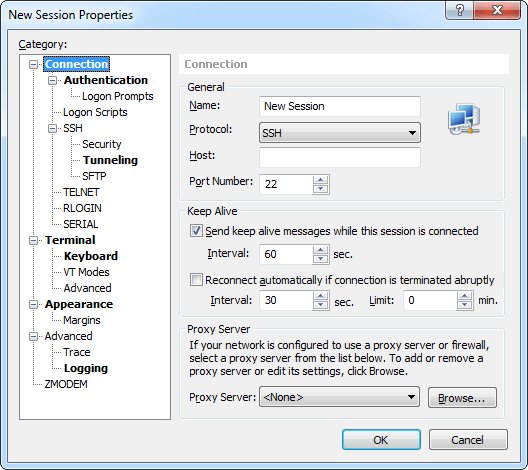
Xshell是一个强大的终端仿真器,支持SSH,SFTP,TELNET,RLOGIN和SERIAL。它提供了业界领先的性能和功能集。企业用户找到有用的功能包括标签式的环境,动态端口转发,自定义键的映射关系,用户定义的按钮,VB脚本,显示2字节字符和国际语言支持UNICODE的终端。 Xshell为诸如Email客户端这样的不安全的TCP/IP程序提供安全保护,支持和Xmanager系统进行安全的X11连接.
Xshell提供许多用户友好的特性,在其他的终端模拟器。这些功能包括:通过拖放操作,有Zmodem文件下载文件的名称,简单的模式,全屏模式,透明度选项和自定义布局模式选择Zmodem档案上传。执行终端任务时,这些功能将节省时间和精力。
=======================================
下载链接来自sharevirus,
未经过安装测试与安全检测,使用者后果自负与本论坛无关
软体版权归原作者及其公司所有,如果你喜欢,请购买正版
=======================================
Xshell is a powerful terminal emulator that supports SSH, SFTP, TELNET, RLOGIN and SERIAL. It delivers industry leading performance and feature sets that are not available in its free alternatives. Features that enterprise users find useful include tabbed environment, dynamic port forwarding, custom key mapping, user defined buttons, VB scripting, and UNICODE terminal for displaying 2 byte characters and international language support.
Xshell offers many user friendly features that are not available in other terminal emulators. These features include Zmodem file upload by drag and drop, Zmodem file download by selecting the file name, simple mode, full screen mode, transparency option and custom layout mode. These features will save time and effort when performing terminal tasks.
Replaces insecure telnet clients.
Xshell supports VT100, VT220, VT320, XTERM, LINUX, SCOANSI and ANSI terminal emulation and provides various terminal appearance options replacing legacy telnet clients.
Supports secure connections for X11 and arbitrary TCP/IP applications.
Xshell supports the port forwarding feature over the SSH tunneling mechanism, so that all TCP/IP applications can share the secure connection without any modification on the program.
Maximize your productivity with built-in user convenience features
Xshell is packed with built-in user convenience features that cannot be found in any other terminal emulator. Features such as tabbed session, Compose bar, window arrangement, instant port forwarding, X11 forwarding, Quick Command bar, and instant layout switch are designed to help users to perform their remote task faster and more efficiently.
Don’t let others take a pick at your information
Xshell supports various security features such as SSH1/SSH2 protocols, password, and DSA/RSA public key user authentication methods, and encrypts all traffics with various encryption algorithms.It is essential to keep your data safe with the built-in Xshell security features, because the traditional connection protocols such as TELNET and Rlogin can leave your network traffic vulnerable to anyone with little bit of network knowledge. Xshell can help you protect your data from hackers.
Multiple languages in a single screen? Xshell is ready when you are
Xshell is the first of its kind that has UTF-8 based terminal. With Xshell, multiple languages can be displayed on a single screen and there is no need to switch between different language encodings. As more businesses are moving towards providing their services, databases and applications in UTF-8 format, there is increasing demand for a terminal emulator that supports UTF-8 encoding. And, Xshell can help you handling the multiple language environment.
System Requirements
Intel® Pentium processor
Operating system Microsoft Windows 2000 SP4 and above
Memory 256 MB (recommends 512 MB)
Hard disk 50 MB
Network TCP/IP Microsoft Winsock 1.1 or later
Required software Internet Explorer®6.0 or later
代码
²²
² ²
²
²²
² ² ²²²
² ² ²²
² ² ²² ² ²² ²
²² ° ² ± ²² ²²
² ²² ² ²² ² ±± ²
²² ²° ²² °° ²
² ² °° ²²
² ²² ² ²
² ²²² ² ² ²
²² ±²²²²²² ° ²²
²² ²²²²²²
²² ²² ²
² ²²² ²°²
²²²
TE 2012 PRESENTS
² ²
ANOTHER FINE RELEASE
Release Xshell 4 Commercial v4.0.0106 c 2012 NetSarang Computer
Date 05/06/2012
Cracked By Twisted EndZ
Release Type
Registration/Serial Crack
Activation Crack
Trial Crack
Server Check Crack
X Serial
Hidden/Added Features Enabler
Other
Loader Patcher Patch Precracked RegFile
Keygen
² ² ² ²
²² ²²
²² RELEASE NOTES ²²
² ²
² ²
²² ²²
Xshell is a powerful terminal emulator that supports SSH, SFTP,
TELNET, RLOGIN and SERIAL. It delivers industry leading
performance and feature sets that are not available in its free
alternatives. Features that enterprise users find useful include
tabbed environment, dynamic port forwarding, custom key mapping,
user defined buttons, VB scripting, and UNICODE terminal for
displaying 2 byte characters and international language support.
Xshell offers many user friendly features that are not available
in other terminal emulators. These features include Zmodem file
upload by drag and drop, Zmodem file download by selecting the
file name, simple mode, full screen mode, transparency option and
custom layout mode. These features will save time and effort when
performing terminal tasks.
Specification
General
· Supports SSH1, SSH2, SFTP, TELNET, RLOGIN and SERIAL protocols
· Windows 2000 SP4 and above
· Multi-user configuration
· Keep-alive option
· Supports Multi-session Session tab, Session bar
· User defined key mapping
· VB Scripting support
· Auto reconnect lost connections
Session Management
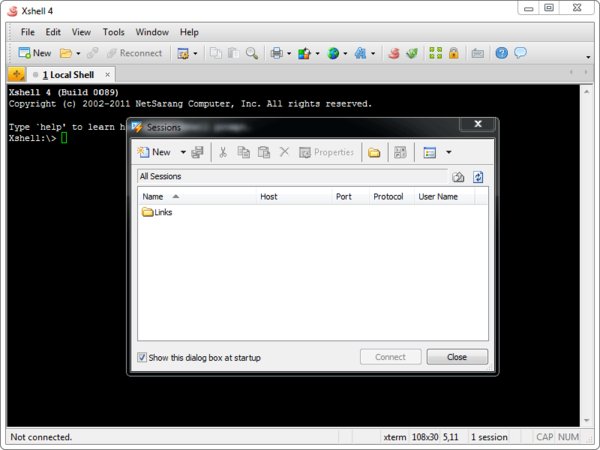
· Creates and manages session files for different hosts
· Provides Sessions dialog, address bar, local prompt, and
shortcut to open sessions
· Provides a default session for quick connections
· Address bar supports URL commands and allows you to connect to
a remote host with or without a saved session
· Start a session with Xactivator
· Automatic logon, wait response scripts
· Folder and tree view support in the Sessions dialog box
· Establish connections to multiple hosts simultaneously
Security
· RSA/DSA public key, Password, and Keyboard Interactive
authentication methods
· RSA/DSA key generation wizard and import/export features
· SSH authentication agent forwarding using Xagent utility
· AES128/192/256, 3DES, BLOWFISH, CAST128, ARCFOUR, and RIJNDAEL
encryption methods
· SHA1, SHA1-96, MD5, MD5-96, and RIPEMD160 MAC algorithms
· zlib compression
· Host key management dialog box
· User key management dialog box
Tunneling
· TCP/IP and X11 forwarding
· Dynamic port forwarding
· Tunneling bar allowing you to monitor active forwarding
channels and add new rules for the current session
Local Command
· Local Xshell prompt for advanced users
· Local commands such as open, ssh, telnet, and rlogin.
· Local Windows commands such as ping, ipconfig, netstat, and
nslookup
· Escape to the local prompt while connecting to a remote host
Terminal
· Supports VT100, VT220, VT320, XTERM, LINUX, SCOANSI, and ANSI
terminals
· International output encoding
· Compose bar lets you send a string of text to multiple servers
simultaneously
· Scroll buffer up to 32767 lines
· Text searching with regular expressions
· Scrolled copy
· Column selection
· Multi-byte support in copy paste
· Delimiter is used when the terminal window is double clicked
· Triple click selects the whole line
· Bold font and ANSI color escape sequences
· Supports terminal network printing
· Configurable line spacing and margin of the terminal window
Appearance
· Simple and powerful user interface
· Adjustable toolbar
· Color scheme edit/import/export feature
· Configurable cursor color and blinking speed
· Font bar allows you to select a preferred font on the fly
· Assign frequently used strings to Quick Command buttons
· Customizable Standard toolbar
· Status bar displays security-lock, selected session, network
up/down traffic information
· Full Screen view Alt + Enter
Interoperability
· Interoperable with Xmanager program for X11 forwarding
· Interoperable with Xagent program for agent authentication and
forwarding
· Interoperable with Xftp program for file transfer
· Editing scroll buffer text with Notepad
· Menu commands to cycle through Xshell windows
File Management
· Drag and Drop file transfer using ZMODEM
· File send and receive via SFTP
· ASCII file upload
· Automatic session logging including terminal code
· Printing selected text, screen, or scroll buffer
System Requirements
Processor
· Intel? Pentium processor
Operating system
· Microsoft Windows 2000 SP4 and above
Memory
· 256 MB recommends 512 MB
Hard disk
· 50 MB
Network
· TCP/IP Microsoft Winsock 1.1 or later
Required software
· Internet Explorer?6.0 or later
For More Info on Xshell 4 Commerical Visit
http //www.netsarang.com/products/xsh_overview.html
TE Release Filename txs4106x.zip
² ² ² ²
²² ²²
²² INSTALLATION NOTES ²²
² ²
² ²
²² ²²
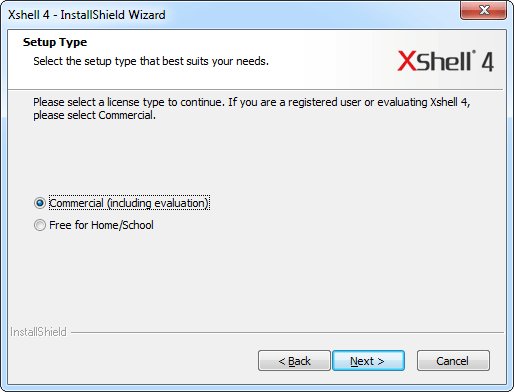
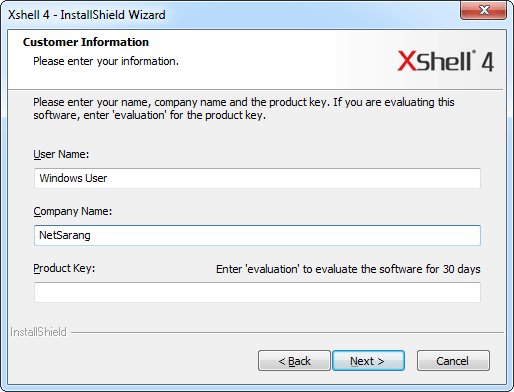
Install Xshell4.exe and choose Commerical edition. Now use the
following for registration
Name Use Anything You Want
Company Use Anything You Want
Serial 690313-111999-999313
License is a standard site license of 999 machines.
Thats it! Enjoy.
²² ²²
²² ²² ² ²² ²²
²² ²² ²² ²²
²²² ²² ² T E 2 0 1 2 ² ²² ²²²
²² ± ²²²²² ²²²²² ± ²²
°² ° ² ²² ²² ² ° ²°
² ²² ²² ascii ²² ²² ²
²²²² °°±±²²²² by mx ²²²²±±°° ²²²²
± ±
² ° ° ²
Don't Hate The Hacker, Hate The Code °
² ²
²
°
软件类型:软件 网络软件
软件性质:破解软件
应用平台:Windows
操作系统:Microsoft Windows 2000 SP4 and above
问题反馈: http://www.netsarang.com/support/main.html
网站链接: http://www.netsarang.com/products/xsh_overview.html
软件介绍:
Xshell是一个强大的终端仿真器,支持SSH,SFTP,TELNET,RLOGIN和SERIAL。它提供了业界领先的性能和功能集。企业用户找到有用的功能包括标签式的环境,动态端口转发,自定义键的映射关系,用户定义的按钮,VB脚本,显示2字节字符和国际语言支持UNICODE的终端。 Xshell为诸如Email客户端这样的不安全的TCP/IP程序提供安全保护,支持和Xmanager系统进行安全的X11连接.
Xshell提供许多用户友好的特性,在其他的终端模拟器。这些功能包括:通过拖放操作,有Zmodem文件下载文件的名称,简单的模式,全屏模式,透明度选项和自定义布局模式选择Zmodem档案上传。执行终端任务时,这些功能将节省时间和精力。
=======================================
下载链接来自sharevirus,
未经过安装测试与安全检测,使用者后果自负与本论坛无关
软体版权归原作者及其公司所有,如果你喜欢,请购买正版
=======================================
Xshell is a powerful terminal emulator that supports SSH, SFTP, TELNET, RLOGIN and SERIAL. It delivers industry leading performance and feature sets that are not available in its free alternatives. Features that enterprise users find useful include tabbed environment, dynamic port forwarding, custom key mapping, user defined buttons, VB scripting, and UNICODE terminal for displaying 2 byte characters and international language support.
Xshell offers many user friendly features that are not available in other terminal emulators. These features include Zmodem file upload by drag and drop, Zmodem file download by selecting the file name, simple mode, full screen mode, transparency option and custom layout mode. These features will save time and effort when performing terminal tasks.
Replaces insecure telnet clients.
Xshell supports VT100, VT220, VT320, XTERM, LINUX, SCOANSI and ANSI terminal emulation and provides various terminal appearance options replacing legacy telnet clients.
Supports secure connections for X11 and arbitrary TCP/IP applications.
Xshell supports the port forwarding feature over the SSH tunneling mechanism, so that all TCP/IP applications can share the secure connection without any modification on the program.
Maximize your productivity with built-in user convenience features
Xshell is packed with built-in user convenience features that cannot be found in any other terminal emulator. Features such as tabbed session, Compose bar, window arrangement, instant port forwarding, X11 forwarding, Quick Command bar, and instant layout switch are designed to help users to perform their remote task faster and more efficiently.
Don’t let others take a pick at your information
Xshell supports various security features such as SSH1/SSH2 protocols, password, and DSA/RSA public key user authentication methods, and encrypts all traffics with various encryption algorithms.It is essential to keep your data safe with the built-in Xshell security features, because the traditional connection protocols such as TELNET and Rlogin can leave your network traffic vulnerable to anyone with little bit of network knowledge. Xshell can help you protect your data from hackers.
Multiple languages in a single screen? Xshell is ready when you are
Xshell is the first of its kind that has UTF-8 based terminal. With Xshell, multiple languages can be displayed on a single screen and there is no need to switch between different language encodings. As more businesses are moving towards providing their services, databases and applications in UTF-8 format, there is increasing demand for a terminal emulator that supports UTF-8 encoding. And, Xshell can help you handling the multiple language environment.
System Requirements
Intel® Pentium processor
Operating system Microsoft Windows 2000 SP4 and above
Memory 256 MB (recommends 512 MB)
Hard disk 50 MB
Network TCP/IP Microsoft Winsock 1.1 or later
Required software Internet Explorer®6.0 or later
代码
²²
² ²
²
²²
² ² ²²²
² ² ²²
² ² ²² ² ²² ²
²² ° ² ± ²² ²²
² ²² ² ²² ² ±± ²
²² ²° ²² °° ²
² ² °° ²²
² ²² ² ²
² ²²² ² ² ²
²² ±²²²²²² ° ²²
²² ²²²²²²
²² ²² ²
² ²²² ²°²
²²²
TE 2012 PRESENTS
² ²
ANOTHER FINE RELEASE
Release Xshell 4 Commercial v4.0.0106 c 2012 NetSarang Computer
Date 05/06/2012
Cracked By Twisted EndZ
Release Type
Registration/Serial Crack
Activation Crack
Trial Crack
Server Check Crack
X Serial
Hidden/Added Features Enabler
Other
Loader Patcher Patch Precracked RegFile
Keygen
² ² ² ²
²² ²²
²² RELEASE NOTES ²²
² ²
² ²
²² ²²
Xshell is a powerful terminal emulator that supports SSH, SFTP,
TELNET, RLOGIN and SERIAL. It delivers industry leading
performance and feature sets that are not available in its free
alternatives. Features that enterprise users find useful include
tabbed environment, dynamic port forwarding, custom key mapping,
user defined buttons, VB scripting, and UNICODE terminal for
displaying 2 byte characters and international language support.
Xshell offers many user friendly features that are not available
in other terminal emulators. These features include Zmodem file
upload by drag and drop, Zmodem file download by selecting the
file name, simple mode, full screen mode, transparency option and
custom layout mode. These features will save time and effort when
performing terminal tasks.
Specification
General
· Supports SSH1, SSH2, SFTP, TELNET, RLOGIN and SERIAL protocols
· Windows 2000 SP4 and above
· Multi-user configuration
· Keep-alive option
· Supports Multi-session Session tab, Session bar
· User defined key mapping
· VB Scripting support
· Auto reconnect lost connections
Session Management
· Creates and manages session files for different hosts
· Provides Sessions dialog, address bar, local prompt, and
shortcut to open sessions
· Provides a default session for quick connections
· Address bar supports URL commands and allows you to connect to
a remote host with or without a saved session
· Start a session with Xactivator
· Automatic logon, wait response scripts
· Folder and tree view support in the Sessions dialog box
· Establish connections to multiple hosts simultaneously
Security
· RSA/DSA public key, Password, and Keyboard Interactive
authentication methods
· RSA/DSA key generation wizard and import/export features
· SSH authentication agent forwarding using Xagent utility
· AES128/192/256, 3DES, BLOWFISH, CAST128, ARCFOUR, and RIJNDAEL
encryption methods
· SHA1, SHA1-96, MD5, MD5-96, and RIPEMD160 MAC algorithms
· zlib compression
· Host key management dialog box
· User key management dialog box
Tunneling
· TCP/IP and X11 forwarding
· Dynamic port forwarding
· Tunneling bar allowing you to monitor active forwarding
channels and add new rules for the current session
Local Command
· Local Xshell prompt for advanced users
· Local commands such as open, ssh, telnet, and rlogin.
· Local Windows commands such as ping, ipconfig, netstat, and
nslookup
· Escape to the local prompt while connecting to a remote host
Terminal
· Supports VT100, VT220, VT320, XTERM, LINUX, SCOANSI, and ANSI
terminals
· International output encoding
· Compose bar lets you send a string of text to multiple servers
simultaneously
· Scroll buffer up to 32767 lines
· Text searching with regular expressions
· Scrolled copy
· Column selection
· Multi-byte support in copy paste
· Delimiter is used when the terminal window is double clicked
· Triple click selects the whole line
· Bold font and ANSI color escape sequences
· Supports terminal network printing
· Configurable line spacing and margin of the terminal window
Appearance
· Simple and powerful user interface
· Adjustable toolbar
· Color scheme edit/import/export feature
· Configurable cursor color and blinking speed
· Font bar allows you to select a preferred font on the fly
· Assign frequently used strings to Quick Command buttons
· Customizable Standard toolbar
· Status bar displays security-lock, selected session, network
up/down traffic information
· Full Screen view Alt + Enter
Interoperability
· Interoperable with Xmanager program for X11 forwarding
· Interoperable with Xagent program for agent authentication and
forwarding
· Interoperable with Xftp program for file transfer
· Editing scroll buffer text with Notepad
· Menu commands to cycle through Xshell windows
File Management
· Drag and Drop file transfer using ZMODEM
· File send and receive via SFTP
· ASCII file upload
· Automatic session logging including terminal code
· Printing selected text, screen, or scroll buffer
System Requirements
Processor
· Intel? Pentium processor
Operating system
· Microsoft Windows 2000 SP4 and above
Memory
· 256 MB recommends 512 MB
Hard disk
· 50 MB
Network
· TCP/IP Microsoft Winsock 1.1 or later
Required software
· Internet Explorer?6.0 or later
For More Info on Xshell 4 Commerical Visit
http //www.netsarang.com/products/xsh_overview.html
TE Release Filename txs4106x.zip
² ² ² ²
²² ²²
²² INSTALLATION NOTES ²²
² ²
² ²
²² ²²
Install Xshell4.exe and choose Commerical edition. Now use the
following for registration
Name Use Anything You Want
Company Use Anything You Want
Serial 690313-111999-999313
License is a standard site license of 999 machines.
Thats it! Enjoy.
²² ²²
²² ²² ² ²² ²²
²² ²² ²² ²²
²²² ²² ² T E 2 0 1 2 ² ²² ²²²
²² ± ²²²²² ²²²²² ± ²²
°² ° ² ²² ²² ² ° ²°
² ²² ²² ascii ²² ²² ²
²²²² °°±±²²²² by mx ²²²²±±°° ²²²²
± ±
² ° ° ²
Don't Hate The Hacker, Hate The Code °
² ²
²
°